Forum Discussion

Power Pivot relations
- Feb 11, 2022
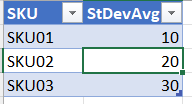
bartvana All credit should go to SergeiBaklan , for the solution in the thread you linked. I just took the same approach to create the following measure that I called "DA":
=CALCULATE(
   SUM(tCompDetailAll[StDevAvg]),
   TREATAS (
      VALUES(tItemVendor[SKU]),
      tCompDetailAll[SKU]
   )
)


Your desired result is
Actually you aggregate both by SKU and Supplier, even if Supplier is not shown here.
As variant you may create two measures
DelayDays:=SUM(tItemVendor[DelTermDays])

and

StDev:=IF( ISBLANK([DelayDays]) , blank(),  SUM(tCompDetailAll[StDevAvg]) )
They give
As a comment, always hide field on many side of relationships, it helps to avoid some errors
 bartvanaFeb 12, 2022Iron Contributor
SergeiBaklan Riny_van_Eekelen Thank you for your answers.
It still isn't really clear to me however, but maybe this is outside of the scope of this forum. In the https://docs.microsoft.com/en-us/dax/treatas-function it says (and Sergei also said this in answer to my other question😞 "Best for use when a relationship does not exist between the tables." But I have a relationship between the tables. What is the use then of such a relationship if I still have to make measures with the same relationship defined in them again?
- SergeiBaklanFeb 12, 2022Diamond Contributor
That's since we try to receive result using many-to-one relationship, which is not supported in Excel directly. Same result as with TREATAS() we may receive using physical relationship, but with measure using CROSSFILTER()
StDevR :=
CALCULATE (
    SUM ( tCompDetailAll[StDevAvg] ),
    CROSSFILTER ( tItemVendor[SKU], tCompDetailAll[SKU], BOTH )
)
In this case we have no SupplierID in PivotTable but DelTermDays are not aggregated, they are used as labels
- bartvanaFeb 12, 2022Iron Contributor
SergeiBaklan OK, so for everything that's many-to-one you need to write a measure, that's more or less it, right?
That's good to know, I thought that by simply creating the physical relationship the magic was going to happen by itself :).