Forum Discussion

Mel_Dyson
Mar 04, 2022Copper Contributor
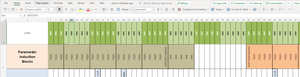
Posting excel doc to Teams and losing formatting
So I have a calendar made in excel listing task by day - it looks perfect. When I post it to Teams in Microsoft the dates show up as hashtags?? I've tried lots of things and I just cant get the dates...

resli-b
Mar 30, 2022Copper Contributor
Mel_Dyson Did you ever work out how to get rid of the ### and get your dates back? I am having the same issue - dates/formatting perfect in desktop but dates are replaced with ##### when opened via Teams. Any suggestions? I'm a bit of a novice.
 Mel_from_the_TerritoryMar 30, 2022Copper ContributorYes, I removed the formating (code) behind the dates. The document I was using was a template that automated the date, the formula was written by another person. I googled how to do this, was simple to do find instructions online, and there are a number of methods to do this.
If you don't have code behind your data (that isn't holding its format when uploaded in Teams), it might be as simple as your margins being to small. These can easily be adjusted by hovering and drag with the mouse to make the sells larger.
My issue was both 🙂
Good Luck