Forum Discussion

pragnya_adi
Apr 16, 2024Copper Contributor
Populate back values entered based on value of a specific cell
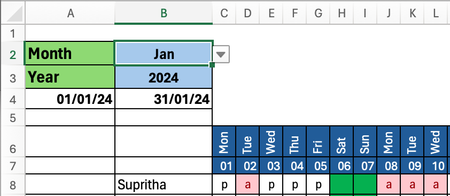
I'm creating this attendance tracker in excel. As you can see that there are entries like a, p for various dates for the month of Jan (B2 cell). These entries are done manually for each date. ...

pragnya_adi
Apr 17, 2024Copper Contributor
HansVogelaar
Thanks for it. It's very good.
But is there a way to do it in the reverse way like
We enter the values in Sheet1 as "a" or "p" and the values w.r.t it gets written in the "List" sheet as we are now filling up.
Thanks for it. It's very good.
But is there a way to do it in the reverse way like
We enter the values in Sheet1 as "a" or "p" and the values w.r.t it gets written in the "List" sheet as we are now filling up.

PeterBartholomew1
Apr 18, 2024Silver Contributor
Excel is an example of a functional programming language which is designed to prevent you the changes you want from happening. Excel values do not evolve during a calculation; they are immutable and, once calculated, their state does not change. Your 'form' on sheet 1 is not allowed to change the state recorded on the database sheet 'List'.
To get a workbook to operate the way you require, you will need to move away from basic worksheet formulae and use an imperative programming environment such as VBA or Microsoft Forms that will allow state change. Your Sheet 1 ceases to be a data input mechanism and is simply a report featuring data extracted from the data table.