Forum Discussion

please help
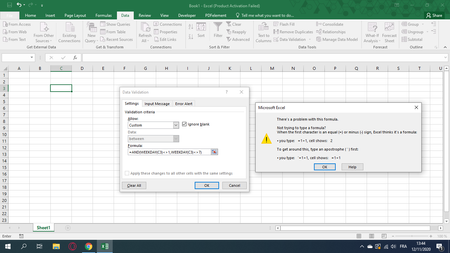
 Nov 12, 20201. Are you absolutely sure your computers language setting is US/English? In some other languages we use ; instead off, as separator
2. In some cases WEEKday starts from 0 instead of 1. Try the Weekday(C3) outside of "data validation"

safoine Perhaps your local settings require a semi-colon to separate arguments in formulae.
Try =AND(WEEKDAY(A2)<>1;WEEKDAY(A2)<>7)
Oooops: didn't see the previous post until I posted mine.
 safoineNov 12, 2020Copper Contributor
Hello Riny_van_Eekelen
thank you a lot it's working
do you have any formula to make the date will not take place during vacations, public holidays and weekends please ?
i create two liste public holidays and vacations.
- Riny_van_EekelenNov 12, 2020Platinum Contributor
safoine Perhaps best demonstrated in the attached file. See if you can "translate" the data validation to your own workbook.
- safoineNov 12, 2020Copper Contributor
hello Riny_van_Eekelen
I appreciate your help so much
Can I make the error message depend on data is entered?For example if the day is weekend the error message tell me it's Sunday or Saturday or if its holiday the error message tells that's a holiday.