Forum Discussion

Planswift Integration
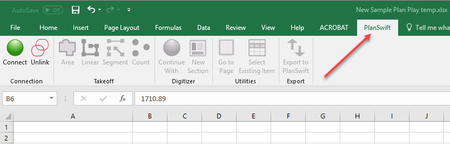
- Sep 04, 2022
Select File > Options.
Select Add-ins in the navigation pane on the left.
Do you see Planswift in the list of Inactive Application Add-ins?
If so, note its type (Excel Add-in or COM Add-in).
Select that type in the Manage drop-down near the bottom, then click Go...
Tick the check box for Planswift, then OK your way out.
Does that restore the Planswift tab?
If you see Planswift in the list of Active Application Add-ins, follow the steps described above, but clear the check box. Then follow them again, and tick the check box.
If that doesn't help, you should reinstall the Planswift add-in.
If you see Planswift in the list of Disabled Application Add-ins (you may have to scroll to the bottom of the list), select Disabled Items from the Manage drop-down and click Go...
Select Planswift and click Enable.
If none of the above options apply, you should reinstall Planswift.

Select File > Options.
Select Add-ins in the navigation pane on the left.
Do you see Planswift in the list of Inactive Application Add-ins?
If so, note its type (Excel Add-in or COM Add-in).
Select that type in the Manage drop-down near the bottom, then click Go...
Tick the check box for Planswift, then OK your way out.
Does that restore the Planswift tab?
If you see Planswift in the list of Active Application Add-ins, follow the steps described above, but clear the check box. Then follow them again, and tick the check box.
If that doesn't help, you should reinstall the Planswift add-in.
If you see Planswift in the list of Disabled Application Add-ins (you may have to scroll to the bottom of the list), select Disabled Items from the Manage drop-down and click Go...
Select Planswift and click Enable.
If none of the above options apply, you should reinstall Planswift.
