Forum Discussion

PivotTable
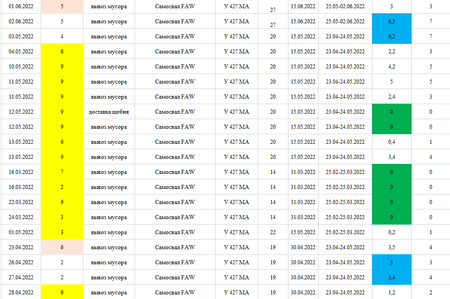

First, I have to ask if it's possible for you to share the original spreadsheet, not just an image. You can post a copy of it on one of the cloud services (OneDrive, GoogleDrive, etc) and placing a link to that file here in this forum.
Second, please answer the following questions:
- How are the colors getting there in the first place? Are you using Conditional Formatting--in which case the conditions themselves could be used for the filtering you're desiring. If you're applying the colors manually, then we'll need to come up with another way (probably a separate column with words like "Yellow," "Blue," "Green")
- Which numbers are you wanting to sum? The numbers IN those color cells, or the numbers in the sixth column of your picture?
There may be more questions, but let's start by seeing if the file can be shared.

Hello, mathetes. Thank's a lot for your attempt to help me.
To share original spreadsheet isn't possible - this is a service document of my company, but I can share the similar copy - https://docs.google.com/spreadsheets/d/1-x7xyCXw78fsytrBN5l3Z7EnHb1E6LY6/edit?usp=sharing&ouid=117347108651710528347&rtpof=true&sd=true
The sheet list1 - original task.
The sheet list2 - my solusion - I made a separete column with words like yellow, blue, green.
The sheet PivotTable - the result from the sheet the list2.
On questions:
1. I didn't use Conditional Formatting, the colours got manually.
2. I want to sum number in columns "time of work" and "the real time of work" on the sheet list1 separately with words like white, yellow, blue and green with out separate column with words like yellow, blue, green.
- mathetesSep 14, 2022Gold ContributorI wasn't able to open the spreadsheet. It prompted me to request access, so I assume you will have gotten a request to grant access.