Forum Discussion

Pivot tables - column grand total no longer available
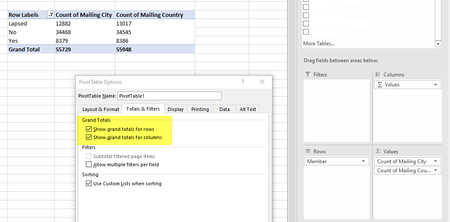

Are Mailing City and Mailing Country column names in your source? In such case it shall be no Grand Total for rows since Pivot Table calculates totals based on fields.
If you drag any column into Columns part of right pane, grand total shall appear.

SergeiBaklan sorry, I should have provided more screenshots. It happens if the variables are listed under Columns. I tried everything I know but nothing worked. BUT it just hit me that I haven't rebooted my laptop in a few days, so I tried that, and the issue is gone. Smh, knowing it is Windows, a reboot should have been one of the first things I tried! Thanks for trying to help!
- SergeiBaklanOct 02, 2019Diamond Contributor
jstanford , okay, great to know
 deckoNov 08, 2019Copper Contributor
SergeiBaklan Hello! I just encountered the same issue but with rows not totaling anymore. I shut down my laptop yesterday when this happened but the issue still there today when I started up. Any ideas?
- SergeiBaklanNov 08, 2019Diamond Contributor
Power Pivot adds totals for rows if as columns you have values of one field. Here you have two separated fields, REVENUE AMT and FREIGHT AMT.
You may add total as Calculated field, let name it Total and expression will be =REVENUE AMT+FREIGHT AMT.
Or use similar measure if you added your data to data model.