Forum Discussion

Pivot Table group positive and negative data
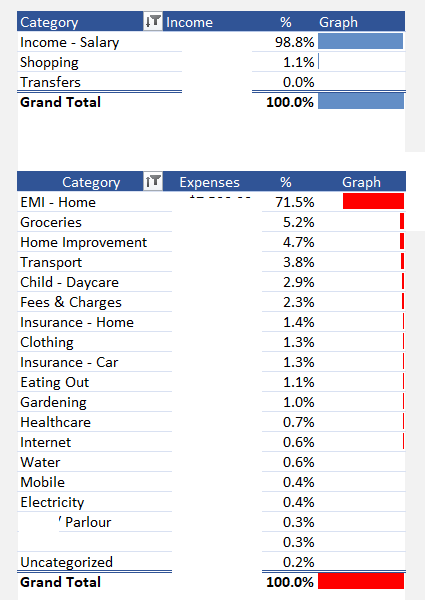
- Jun 28, 2023
Attached an example with a single [Amount] column with Positive & Negative values:
Edit the query in the attachment and follow the steps in APPLIED STEPS (all done with the UI). Once you've separated your [Income] & [Expense] (the added Custom steps) and removed [Amount] that's no longer necessary, right-click on column [Category] and in the drop-down menu select Unpivot Other Columns
IMPORTANT:
- For [Expense] you'll see I used function Number.Abs to convert to negative [Amount]s to positive. If you want your Expense to show negative in your PivotTable then remove Number.Abs (you will have to adjust the Graph DAX measure)
- When you add Custom Columns [Income] & [Expense] Power Query doesn't auto. Type the columns. Taking ex. [Income] when you create it, it displays exactly as below in PQ formula bar:
You must edit the formula and add, before ): , type number then Validate:
You must do the same for the [Expense] column
Reason is: default data Type in Power Query is Type any. Column(s) of Type any loaded to the Excel Data Model will be assigned the Type Text (no Sum, Avg... possible)

I use Microsoft office 365, with the latest excel version. Please provide your suggestion.

Hi Rohan110
Sample attached:
#1 Table1 is loaded to Power Query to Unpivot [Expense] & [Income] (kept the default "Attribute" column name - easy to change)
#2 Unpivoted table loaded to the Excel Data Model (Windows only)
#3 A couple of DAX measures (don't ask too much I have very basic knowledge)
- Rohan110Jun 28, 2023Tin ContributorHi L z.
Thanks for your quick response. Could you please let me know how you carried out unpivoting step which resulted in categorizing the data as rows and columns.
Also, my raw data has a single column of income and expenses, income in positive values and expense as negative values. Does this mean i need to split them into separate column, positive and negative and then carryout your method? Appreciate your support on this.- LorenzoJul 15, 2023Silver Contributor
Hi Rohan110
Does no news means good news? (Marking solutions helps people who Search...)
- Rohan110Sep 17, 2023Tin ContributorHi Lz,
Thanks for the useful tip and also taking time in explaining it in very detailed format.
- LorenzoJun 28, 2023Silver Contributor
Attached an example with a single [Amount] column with Positive & Negative values:
Edit the query in the attachment and follow the steps in APPLIED STEPS (all done with the UI). Once you've separated your [Income] & [Expense] (the added Custom steps) and removed [Amount] that's no longer necessary, right-click on column [Category] and in the drop-down menu select Unpivot Other Columns
IMPORTANT:
- For [Expense] you'll see I used function Number.Abs to convert to negative [Amount]s to positive. If you want your Expense to show negative in your PivotTable then remove Number.Abs (you will have to adjust the Graph DAX measure)
- When you add Custom Columns [Income] & [Expense] Power Query doesn't auto. Type the columns. Taking ex. [Income] when you create it, it displays exactly as below in PQ formula bar:
You must edit the formula and add, before ): , type number then Validate:
You must do the same for the [Expense] column
Reason is: default data Type in Power Query is Type any. Column(s) of Type any loaded to the Excel Data Model will be assigned the Type Text (no Sum, Avg... possible)
- Rohan110Oct 02, 2023Tin Contributor
There is a problem with this approach. As you can see, with this approach, as transfers has both positive and negative values in the data, it gets listed in both income and expense. With this approach I'm unable to calculate my net income and net expenses. Could you please help with this?