Forum Discussion

MAEKO
Apr 27, 2023Copper Contributor
Pivot Table Date Format
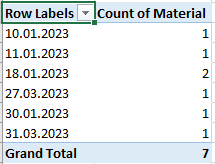
Hello, I am taking a values on the system automatically. Date format is DD.MM.YYYY My PC date setting is DD.MM.YYYY. When i wanted to create pivot table, dates seems ungroup. But i click two times...
- Apr 27, 2023
That sounds like Excel originally treated the dates as text.
You can try the following:
- Select the dates in the source data.
- On the Data tab of the ribbon, click Text to Columns.
- Select Delimited, then click Next >> twice.
- In step 3, select DMY from the Date drop down.
- Click Finish.
To group by month, quarter and year in the pivot table:
- Right-click any of the (ungrouped) dates in the pivot table.
- Select Group... from the context menu.
- Select Months, Quarters and Years.
- Click OK.

HansVogelaar
Jun 23, 2024MVP
There is no Group By item in the context menu.
What happens if you select a single date and right-click it, then select Group... from the context menu?

Rodolfo1950
Jun 24, 2024Copper Contributor
HansVogelaar Same story: just "Group", no "Group by". I have tried with other combinations of dates: same result.
- HansVogelaarJun 24, 2024MVP
I repeat my request from yesterday:
Could you attach a small sample workbook demonstrating the problem (without sensitive data), or if that is not possible, make it available through OneDrive, Google Drive, Dropbox or similar?