Forum Discussion

Omar_Uribe
Feb 02, 2026Copper Contributor
Paste values-only Excel
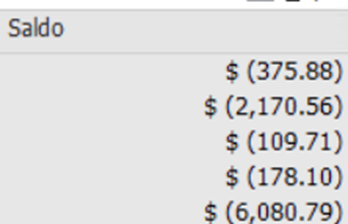
I copy data from websites and different software and paste it into Excel 2019. The values are pasted correctly—without the currency symbol or extra space before the numbers—even when using "Paste Val...

Olufemi7
Feb 04, 2026Steel Contributor
Hello Omar_Uribe,
In Excel 365, Paste Values Only pastes exactly what is copied, including currency symbols and spaces (e.g., $ 1234), so the result is stored as text; Excel 2019 may automatically convert it to a number, but 365 is more literal.
According to Microsoft Docs, “Paste Values only pastes the values as displayed in the source cells. It does not remove any characters in the text or convert text to numbers.”
Paste options
To fix this, you can use
=NUMBERVALUE(SUBSTITUTE(A1,"$ ",""))apply Text to Columns, or use a VBA macro like:
Sub PasteValuesClean()
    Dim rng As Range, cell As Range
    Set rng = Application.InputBox("Select where to paste:", Type:=8)
    rng.PasteSpecial Paste:=xlPasteValues
    For Each cell In rng
        If VarType(cell.Value) = vbString Then
            cell.Value = Replace(cell.Value, "$ ","")
            If IsNumeric(cell.Value) Then cell.Value = Val(cell.Value)
        End If
    Next cell
End Sub
This will paste data without $ and convert it to numbers automatically.