Forum Discussion

Trumpetnut
May 07, 2024Copper Contributor
Output names to a grid comparing two data points
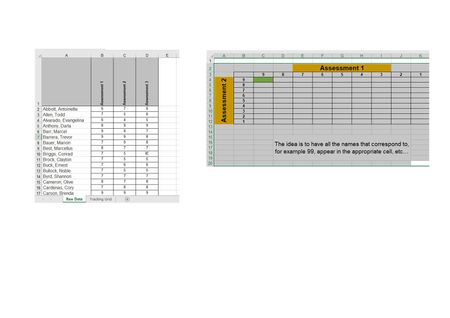
Hi I have a table with columns for student names and assessment scores for multiple assessments, each graded 1 to 9. I also have a tracking table where grades for one assessment go horizontally an...
- May 07, 2024
In C4 on the Tracking Grid sheet:
=TEXTJOIN(", ", TRUE, FILTER('Raw Data'!$A$2:$A$100, ('Raw Data'!$B$2:$B$100=C$3)*('Raw Data'!$C$2:$C$100=$B4), ""))
Adjust the ranges if the data on Raw Data extend below row 100.
Fill to the right and down.

HansVogelaar
May 07, 2024MVP
In C4 on the Tracking Grid sheet:
=TEXTJOIN(", ", TRUE, FILTER('Raw Data'!$A$2:$A$100, ('Raw Data'!$B$2:$B$100=C$3)*('Raw Data'!$C$2:$C$100=$B4), ""))
Adjust the ranges if the data on Raw Data extend below row 100.
Fill to the right and down.
 TrumpetnutMay 07, 2024Copper ContributorHi Hans, you utterly magnificent Excel beast. Thank you so much. That has worked perfectly.
Kind Regards
Simon- TrumpetnutOct 30, 2024Copper ContributorHi Hans. Following on from the above solution, do you know of a way to have the names appear in the grid with an associated hyperlink? So, someone can look at the grid and click on the name that will take them to a linked document?
Kind Regards
Simon- HansVogelaarOct 30, 2024MVP
I'm afraid that is not possible. The formula may return more than one name in a cell, but you can't hyperlink part of a cell. Only one hyperlink can be assigned to a cell, and it will act on the cell as a whole.