Forum Discussion

TaurusGear13
Mar 13, 2025Copper Contributor
Office Scripts Custom Sort Failing During Automation
I am attempting to use office scripts within a OneDrive Excel document within Microsoft Teams to run a custom sort. Using the "Record Action" feature, I simply attempted to sort the range H3:J28 via ...
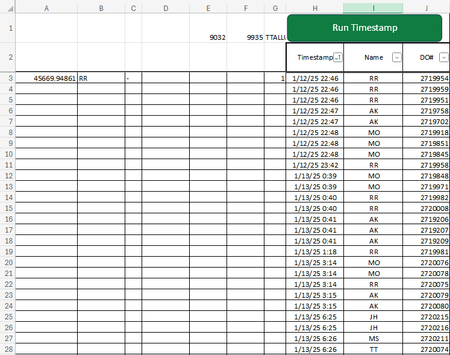
- Mar 13, 2025
Please try
function main(workbook: ExcelScript.Workbook) {

    const sheet = workbook.getActiveWorksheet()
    const range = sheet.getRange("H3:J28")

    const rangeSort: ExcelScript.SortField = {
        ascending: true,
        key: 0,
        sortOn: ExcelScript.SortOn.value
    }

    range.getSort().apply(
        [rangeSort],
        false,  // case insensitive
        false,  // no headers
        ExcelScript.SortOrientation.rows
    )

}

lli99
Mar 26, 2025Copper Contributor
Hi I'm trying to do the same, but with two custom sort levels keep getting errors. Can you help?
}// Custom sort on range range A2:AV610 on selectedSheet
selectedSheet.getRange("A2:AV610").getSort().apply([{ key: 5, ascending: true }, { key: 0, ascending: true }], false, true, ExcelScript.SortOrientation.columns);

SergeiBaklan
Mar 27, 2025Diamond Contributor
Can't reproduce any errors, it works
function main(workbook: ExcelScript.Workbook) {

    const sheet = workbook.getActiveWorksheet()

    sheet.getRange("A2:AV610")
        .getSort().apply(
            [
                { key: 5, ascending: true },
                { key: 0, ascending: true }
            ],
                false, true, ExcelScript.SortOrientation.columns
        )
}
Columns become sorted.
- lli99Mar 27, 2025Copper Contributor
Oh I didn't use the bracket, it works now thank you!