Forum Discussion

Office Script: Add Hyperlink to a column within an Excel Table
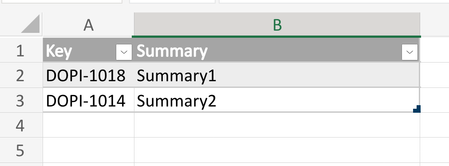
- Sep 21, 2023
David, I forgot we may set hyperlink directly in script without applying the formula. This is on cell by cell basis and ignores blanks
function main(workbook: ExcelScript.Workbook) {

    const tableName = "TB_TEST"
    //const url = "\"https://MY_SITE.atlassian.net/browse/"
    const url = "https://MY_SITE.atlassian.net/browse/"

    const keyColumn = workbook
        .getTable(tableName)
        .getColumn(1)
        .getRangeBetweenHeaderAndTotal()

    const rows = keyColumn.getRowCount()
    for (i = 0; i < rows; i++) {

      const cell = keyColumn.getCell(i, 0);
      const v = cell.getValue();
      const hyperlink: ExcelScript.RangeHyperlink = {
        address: url + v,
        screenTip: v,
        textToDisplay: v
        };
      cell.setHyperlink(hyperlink);
    }
}
didn't play with that, but perhaps if you take URL as
const url = workbook.getNamedItem("jiraSiteIssue").getValue()it will work with above script

David, I guess we need to add getRange with named cell, otherwise it returns this cell address.
To avoid performance warning we may load all values to an array and use it on iterations.
All together
function main(workbook: ExcelScript.Workbook) {

  const tableName = "TB_TEST"
  const columnKey = "Key"
  const url = workbook
    .getNamedItem("jiraSiteIssue")
    .getRange()
    .getValue()

  const keyColumn = workbook
    .getTable(tableName)
    .getColumn(columnKey)
    .getRangeBetweenHeaderAndTotal()

  const values = keyColumn.getValues()
  const nRows = keyColumn.getRowCount()

  let i: number = 0
  for (i = 0; i < nRows; i++) {
    keyColumn.getCell(i,0).setHyperlink( {
      address: url + values[i][0].toString(),
      textToDisplay: values[i][0].toString(),
      screenTip: values[i][0].toString(),
    })
  }
}
@Sergei Baklan Exactly we replied at the same time, I got to a similar conclusion, to get the value first and to invoke getRange.getValue() to get the value of the named Range. Anyway performance is an issue, for 500 rows about 25 seconds under Excel Desktop, and running from my Mac using Excel Web, more than 2 minutes and sometime I got a time out.
On contrary, the variant approach using HYPERLINK function is incredibly fast. The output is less friendly, because the cell has instead of the key value the call to HYPERLINK. I don't think the variant approach can be applied for setHyperlink, because this function needs a range and the variant needs an array.
- davidlealSep 22, 2023Iron ContributorThanks @SergeiBaklan, maybe I was not clear enough. The variant approach is the fast solution, no need to improve it. The solution using setHyperlink is the one that has performance issue. Looking at your last approach is an improvement of the variant solution and as you indicated it has some limitations in terms of Excel environment.
- SergeiBaklanSep 22, 2023Diamond Contributor
davidleal , I expected that's not fast, but didn't think that's so slow. Thank you for the feedback.
I tried to set all formulae at once to avoid cell by cell iteration, like
function main(workbook: ExcelScript.Workbook) {

  const tableName = "TB_TEST"
  const columnKey = "Key"
  const url = workbook
    .getNamedItem("jiraSiteIssue")
    .getRange()
    .getValue()

  const keyColumn = workbook
    .getTable(tableName)
    .getColumn(columnKey)
    .getRangeBetweenHeaderAndTotal()

  const formulae: string[][] = keyColumn
    .getValues()
    .map(x =>
      (x.toString() === "") ?
      [x.toString()] :
      ["=HYPERLINK(\"" + url + x.toString() + "\", \"" + x.toString() + "\")"]
      )
  keyColumn.setFormulas(formulae)
}
That works for the range but not for the table. More exactly, for the table it works on Excel for web and not on Windows desktop. On the latest it takes first formula in the array, apply it as table column formula and ignore the rest. Thus we have exactly the same formula in all cells of the column.
If works, not sure how good the performance is, didn't test.