Forum Discussion

Office Script: Add Hyperlink to a column within an Excel Table
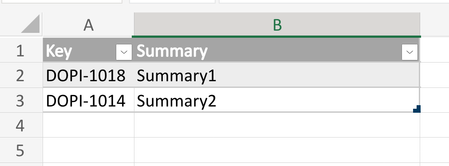
- Sep 21, 2023
David, I forgot we may set hyperlink directly in script without applying the formula. This is on cell by cell basis and ignores blanks
function main(workbook: ExcelScript.Workbook) {

    const tableName = "TB_TEST"
    //const url = "\"https://MY_SITE.atlassian.net/browse/"
    const url = "https://MY_SITE.atlassian.net/browse/"

    const keyColumn = workbook
        .getTable(tableName)
        .getColumn(1)
        .getRangeBetweenHeaderAndTotal()

    const rows = keyColumn.getRowCount()
    for (i = 0; i < rows; i++) {

      const cell = keyColumn.getCell(i, 0);
      const v = cell.getValue();
      const hyperlink: ExcelScript.RangeHyperlink = {
        address: url + v,
        screenTip: v,
        textToDisplay: v
        };
      cell.setHyperlink(hyperlink);
    }
}
didn't play with that, but perhaps if you take URL as
const url = workbook.getNamedItem("jiraSiteIssue").getValue()it will work with above script


davidleal The reason it doesn't work is that you are creating a circular reference with this formula, the formula is pulling the key from its own cell. If you would add a new column for the hyperlinks, all would be well:
function main(workbook: ExcelScript.Workbook) {
  // Get the current worksheet.
  const TARGET_TABLE_NAME = "TB_TEST";
  const table = workbook.getTable(TARGET_TABLE_NAME);
  const keyColumn = table.getColumn(1).getRangeBetweenHeaderAndTotal();
  const keyColumnName = table.getColumn(1).getName();
  const newColumn = table.addColumn(-1, null, "Link");
  console.log(`Column name: '${keyColumnName}'`);
  //const url = workbook.getNamedItem("jiraSiteIssue").getValue();
  const url = "\"https://MY_SITE.atlassian.net/browse/\"";
  const key = "\"DOPI-1018\"";
  //keyColumn.setFormula(`=HYPERLINK(${url}&${key},${key})`);
  newColumn.getRangeBetweenHeaderAndTotal().setFormula(`=HYPERLINK(${url}&[@[${keyColumnName}]],[@[${keyColumnName}]])`);
}
Of course you need to handle the situation if there already is a column named "link".

JKPieterse thanks it works, but it adds an extra column, which is something I can do with Excel, no need to use Office Script for that. I would say I can delete the original column, no to append the Link column but insert after the first column, then delete Key column and rename the inserted column. I guess it is doable, but I am new to Office Script (I had a similar idea using Power Query, but it doesn't support hyperlink and at the end requires manual intervention).
I my real example I have additional information in the Sheet and I don't know how this will affect formula integrity, I have several formulas in this Sheet. Is there a way to do it without adding a new column?
- SergeiBaklanSep 21, 2023Diamond Contributor
As variant
function main(workbook: ExcelScript.Workbook) { const tableName = "TB_TEST" const url = "\"https://MY_SITE.atlassian.net/browse/" const keyColumn = workbook .getTable(tableName) .getColumn(1) .getRangeBetweenHeaderAndTotal() const formulae = keyColumn .getValues() .map(x => Array.of( "=HYPERLINK(" + url + x + "\", \"" + x + "\"") ) keyColumn.setFormulas(formulae) }- davidlealSep 21, 2023Iron Contributor
Thanks SergeiBaklan great it works and it doesn't show the warning about performance. I just have a couple of questions/comments.
What if the Excel table has empty rows?, is it possible to prevent this?, basically I could have empty lines at. the end, so the hyperlink function should apply only if the cell is not empty. How we can prevent this?
In my real example I take the url from a named range (defined in the Name Manager), as in my original post. I was trying to adapt it from your last code, but it doesn't work, for example:
function main(workbook: ExcelScript.Workbook) {

  const tableName = "TB_TEST"
  //const url = "\"https://MY_SITE.atlassian.net/browse/"
  const url = "\"" + workbook.getNamedItem("jiraSiteIssue").getValue()
  console.log(`url: '${url}'`)

  const keyColumn = workbook
    .getTable(tableName)
    .getColumn(1)
    .getRangeBetweenHeaderAndTotal()

  const formulae = keyColumn
    .getValues()
    .map(x => Array.of("=HYPERLINK(" + url + x + "\", \"" + x + "\""))
  keyColumn.setFormulas(formulae)

}
The log output is the following:
url: '"Settings!$AR$1:$AR$1'so the output is the location of the value, but not the actual value, and therefore the output is not the expected:
Thanks for any help,
David
- SergeiBaklanSep 21, 2023Diamond Contributor
David, I forgot we may set hyperlink directly in script without applying the formula. This is on cell by cell basis and ignores blanks
function main(workbook: ExcelScript.Workbook) {

    const tableName = "TB_TEST"
    //const url = "\"https://MY_SITE.atlassian.net/browse/"
    const url = "https://MY_SITE.atlassian.net/browse/"

    const keyColumn = workbook
        .getTable(tableName)
        .getColumn(1)
        .getRangeBetweenHeaderAndTotal()

    const rows = keyColumn.getRowCount()
    for (i = 0; i < rows; i++) {

      const cell = keyColumn.getCell(i, 0);
      const v = cell.getValue();
      const hyperlink: ExcelScript.RangeHyperlink = {
        address: url + v,
        screenTip: v,
        textToDisplay: v
        };
      cell.setHyperlink(hyperlink);
    }
}
didn't play with that, but perhaps if you take URL as
const url = workbook.getNamedItem("jiraSiteIssue").getValue()it will work with above script
- SergeiBaklanSep 21, 2023Diamond Contributor
Make it cell by cell (example is in previous post). If performance is critical you may push formulae into dynamic array and when set formula from it.