Forum Discussion

ODBC driver issue in Macro VBA

Hello Mike1983 ,
this may not be what you want to hear, but the 64 bit version of Office should really be the default installation these days. It's only a few legacy add-ins that still require 32 bit Excel and you may not even run these. 64 bit Excel can use more of your computer's memory and will run better.

Hello IngeborgHawighorst.
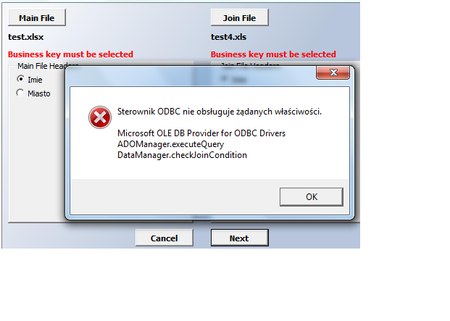
Thanks for reply. I've re-installed from 32-bit verstion to 64 bit and now it is working when use XLSX and XLS fiels created on this version of Excel. However, if I try to use XLS file created before when I was using 32-bit version it is still the same problem. So it is working once I am comparing XLSX with XLS both created on 64 bit Excel version.
I am still wondering if there is any way to handle the case when file was created on 32-bit Excel version. I understand that 32-bit is becoming legacy but if you got a file like this then you are stuck and macro will not go ahead 😞
Btw - first phrase was in Polish and it is "odbc driver does not support the requested properties".