Forum Discussion

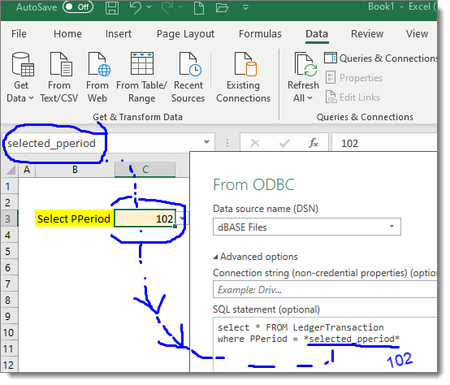
ODBC data connection with parameter from drop down
- Sep 09, 2020
SergeiBaklan thank you that is exactly it! I added the line you mentioned and it works! For anyone else looking for this solution, here it is:
let
    pperiod = Excel.CurrentWorkbook(){[Name="reneirs_pperiod"]}[Content]{0}[Column1],
    pperiod_text = Text.From(pperiod),
    Source = Odbc.Query("dsn=PASTEL.odbc", "select * from LedgerTransactions where PPeriod = " & pperiod_text)
in
    Source


Generate query with any hardcoded parameter, e.g. 102. After that in advanced editor add getting parameter string and correct generated query with it, like
let
    parameter = Excel.CurrentWorkbook(){[Name="selected_pperiod"]}[Content]{0}[Column1],

...."start query" & parameter & "end query"- Michelle99Sep 08, 2020Brass ContributorThank you very much for such a prompt reply. I am quite new at connecting to data from within excel. When you say “generate query”... quite honestly all I know how to do is click the “Get Data” button and enter my sql in there. Could you please tell me how to generate the query and where to write that code?
(Sorry I’m catching up on years here of excel inactivity.)- SergeiBaklanSep 08, 2020Diamond Contributor
First you initiate connection as (in your case from ODBC)
On next step click Transform (not Load)
Open Home-Advanced Editor for Power Query, it'll be something like
let
    Source = Sql.Database("server", "database", [Query="select * from Department where Id=8"])
in
    Source
Modify code as
let
    parameter = Excel.CurrentWorkbook(){[Name="selected_pperiod"]}[Content]{0}[Column1],
    Source = Sql.Database("server", "database",
        [Query="select * from Department where Id=" & parameter ])
in
    Source
Click Done. If works you may load the query from here
- Michelle99Sep 09, 2020Brass Contributor
SergeiBaklan , thank you once again for your reply. I've made some progress by following your suggestion. However, now I have the below error. Sorry to ask for your help for a third time, could you please help me resolve it?
And for what it's worth, I played with the query by converting the parameter to Text. The error changed (a little):
