Forum Discussion

Not all date fields are showing up in Timeline slicer option
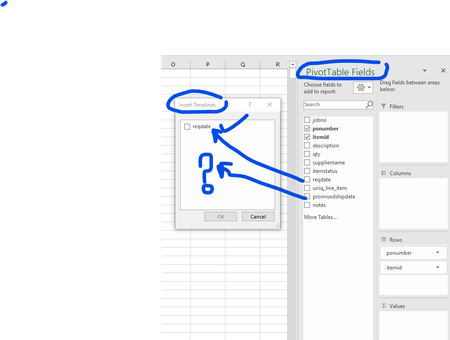
- Oct 24, 2019
You may format cells as dates but actually have texts within it. You may check by ISTEXT() if so or not.

You may format cells as dates but actually have texts within it. You may check by ISTEXT() if so or not.

SergeiBaklan thank you Sergei - yes there were some text in the data fields. These came from trying to insert a default date when a vlookup did not find suitable result in the lookup table.
=IFNA(VLOOKUP([@[uniq_line_item]],saved_promise_date_hard[#All],2,FALSE),"1/1/1900")
the thing is if the item being looked exists in the look up table but there is no data ie blank then it returns the value as a date
but if the value looked up does not exist in the look up table then default value returned is text formatted of the default
My question would be how could write this better that the default value entered is a date and not text. I have also posted this as a separate question since I marked your response to my initial question as best response. Please provide your feedback there if possible