Forum Discussion

Vineet2300
Apr 25, 2024Copper Contributor
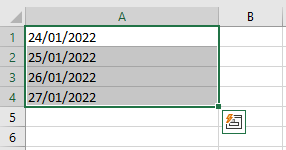
Not able to fillup continuous dates using Autofill option or Fill handle.
I want to fill up the excel cells with continuous date but while using fill handle the date get repeated. Here i want to continue dates to the following cells. Now as ...

Yea_So
Apr 28, 2024Bronze Contributor
Right click the + pull handle, drag one cell down then drag it back to its original position, this will pop up:
Select series> select columns> at the stop value enter the end date
Cheers
 DrMuraliApr 28, 2024Copper ContributorFirst, one has to make sure that the first cell does contain the date. Then, simply select the first cell, right click the pull handle, go down as far as you would like, and select Fill Days, Fill Weekdays, Fill Months or Fill Years and it works just fine.