Forum Discussion

Vineet2300
Apr 25, 2024Copper Contributor
Not able to fillup continuous dates using Autofill option or Fill handle.
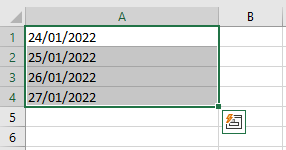
I want to fill up the excel cells with continuous date but while using fill handle the date get repeated. Here i want to continue dates to the following cells. Now as ...

SnowMan55
Apr 25, 2024Bronze Contributor
It is highly likely that your existing cells do not contain Excel dates, but instead contain text (a string of characters) that look like dates. Clue: Excel dates are numbers, so they are usually right-aligned in their cells.
To confirm this, you can use the TYPE function: Put the formula =TYPE(A1) into an unused cell; if the result is 2, A1 contains text; if the result is 1 (indicating a number), the problem is something else.
Note: Just changing the cell format to Date does not fix this problem. Recommend that you delete the content of your four cells, select the entire column A, change the format to General, and re-enter the values.