Forum Discussion

New to excel
- Sep 04, 2023
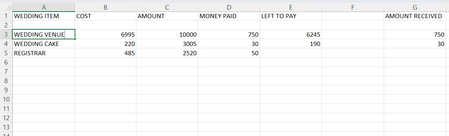
I kept the basic arrangement you proposed but made 1 change.
I believe it's best to list the starting budget at the top of sheet and have the rows display the 'money on hand' to take into account the money spent in the same row. In other words, the 'amount' in the first line won't be 10,000 - it will be 3,005.
Next, I created dynamic named ranges for AmountReceived, Cost, LeftToPay, and MoneyPaid (I've included some notes on these in the attached workbook).
Dynamic named ranges make the formula in the 'LeftToPay' column very easy, and you won't have to update anything:
=Cost-MoneyPaidThe amount is then determined with some basic accumulation:
=LET(
    accumulate, LAMBDA(a, v, a + v),
    RunningCost, SCAN(0, Cost, accumulate),
    Budget - RunningCost
)

I kept the basic arrangement you proposed but made 1 change.
I believe it's best to list the starting budget at the top of sheet and have the rows display the 'money on hand' to take into account the money spent in the same row. In other words, the 'amount' in the first line won't be 10,000 - it will be 3,005.
Next, I created dynamic named ranges for AmountReceived, Cost, LeftToPay, and MoneyPaid (I've included some notes on these in the attached workbook).
Dynamic named ranges make the formula in the 'LeftToPay' column very easy, and you won't have to update anything:
=Cost-MoneyPaid
The amount is then determined with some basic accumulation:
=LET(
    accumulate, LAMBDA(a, v, a + v),
    RunningCost, SCAN(0, Cost, accumulate),
    Budget - RunningCost
)
 Sean_Mack_1975Sep 04, 2023Copper ContributorThank you so much for taking the time to do this. This is exactly what I wanted and looking at the formulas I would never have been able to do this.
Thanks again 🙂- Patrick2788Sep 04, 2023Silver ContributorYou're welcome!