Forum Discussion

New Excel user needing help!

When you say black format, do you mean merged cells?

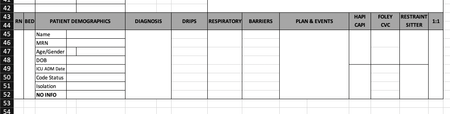
Thanks for reading and reaching out to attempt to help me! Sorry if I wasn't clear. Maybe this new screenshot will help. I created a blank worksheet that we will fill in with patient data. I have created some cells that have drop down boxes with choices to input data (trying to decrease keystrokes and standardize data). Other cells I have CountIf formulas to tally certain responses that will be on the very first page of this document. The remaining cells will be free text input. I learned how to have my column titles ( lack of the right terminology ) to be repeated at the top of every page. So I am not worried about that row.
It's the 8 rows that will have the patient data in them that needs to be repeated.
The text you see in the third column needs to be in their respective cells throughout the document. Once the document is filled with the patient data there will be times when I need to add another room (8 rows) in between the two rooms. Is there a short cut way to add rows and then excel will keep the same format (borders, formulas and drop down boxes, etc) and most importantly keeping the text that is in the third column?
I know the long way of it such as inserting a new row, copy the cells (room) above and then pasting it in the new row. At this point I will have to erase all of the duplicate data that was copied. This also creates turmoil for those not so computer savvy individuals.
Look forward to your thoughts, Kimberly
- PascalKTeamOct 10, 2019Iron Contributor
Excel keeps all that (format, borders, drop down, etc.) when you copy a range of rows into a new location. You can also paste in the middle of the table. (see attached video)
What you could do is have one "Master Table" with your 8 rows and always use this as the source when adding a new patient, this way you don't have dublicate values
I hope I understood your issue....