Forum Discussion

Aaron Lockett
Apr 24, 2018Brass Contributor
Nested IF
Hopefully someone can understand what I'm trying to achieve and lend a helping hand! The formula I'm trying to use is as follows: =IF(K2="",D,IF( (L2="Expired"),IF(O5="" AND L2=""),"In Progress"...
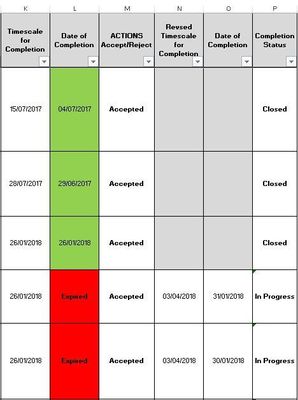
- Apr 24, 2018
=IF(O2<>"", "Closed", IF(OR(L2="Expired",ISBLANK(L2)),"In Progress","Closed"))

SergeiBaklan
Apr 24, 2018Diamond Contributor
Like this
=IF(ISBLANK(K2),"",IF( OR(L2="Expired",ISBLANK(L2)),"In Progress",IF(OR(O2<>"",L2<>""),"Closed","Not defined")))

Aaron Lockett
Apr 24, 2018Brass Contributor
Hi Sergei,
This doesn't take into account if Column L is "Expired" and a date is given in Column O. Column P should display "Closed"
- SergeiBaklanApr 24, 2018Diamond Contributor
Let define your rules then. Initially
Column L is blank or "Expired" then Column P should display "In Progress". If Column L or Column O is NOT blank, Column P is to display "Closed"
It looks like it shall be
if O <> blank then Closed else
if (L = blank or L = Expired) then In Progress else empty
Correct?
- Aaron LockettApr 24, 2018Brass Contributor
Yes that is correct. That is how I would like it to work.
- SergeiBaklanApr 24, 2018Diamond Contributor
When you may use Detlef's latest formula if only change semicolon on comma ( I guess misprint)