Forum Discussion

Gamer85308
May 15, 2023Tin Contributor
Need to further automate an Excel formula
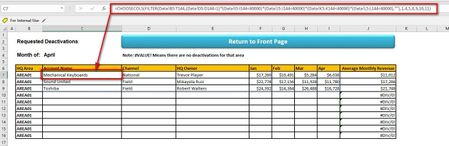
Hello and thank you in advance. I am using Office 365 and here is the formula which needs more work. I need two things added to it. If you click on the image it will grow larger. 1. I need to wrap i...
- May 15, 2023
The formula in C7 can be changed to
=IFERROR(CHOOSECOLS(FILTER(Data!B5:T144,(Data!D5:D144=1)*(Data!I5:I144<40000)*(Data!J5:J144<40000)*(Data!K5:K144<40000)*(Data!L5:L144<40000),""),1,4,5,8,9,10,11),"")

Gamer85308
May 15, 2023Tin Contributor
@HansVogelaar
I didn't know I could do that. My Excel has only first names, revenue numbers, and number of shipments. There is no sensitive data otherwise. Can I attach it here and then delete it later?
I didn't know I could do that. My Excel has only first names, revenue numbers, and number of shipments. There is no sensitive data otherwise. Can I attach it here and then delete it later?

HansVogelaar
May 15, 2023MVP
As for the date problem, if would be better if you used dates in the headers, formatted with the custom number format mmm. That would make it easier to use them in dynamic formulas.