Forum Discussion

Gamer85308
May 15, 2023Tin Contributor
Need to further automate an Excel formula
Hello and thank you in advance. I am using Office 365 and here is the formula which needs more work. I need two things added to it. If you click on the image it will grow larger. 1. I need to wrap i...
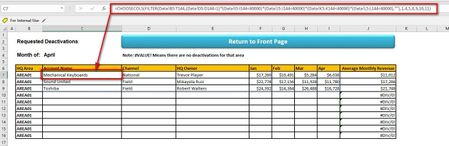
- May 15, 2023
The formula in C7 can be changed to
=IFERROR(CHOOSECOLS(FILTER(Data!B5:T144,(Data!D5:D144=1)*(Data!I5:I144<40000)*(Data!J5:J144<40000)*(Data!K5:K144<40000)*(Data!L5:L144<40000),""),1,4,5,8,9,10,11),"")

Gamer85308
May 15, 2023Tin Contributor
@HansVogelaar
I didn't know I could do that. My Excel has only first names, revenue numbers, and number of shipments. There is no sensitive data otherwise. Can I attach it here and then delete it later?
I didn't know I could do that. My Excel has only first names, revenue numbers, and number of shipments. There is no sensitive data otherwise. Can I attach it here and then delete it later?

HansVogelaar
May 15, 2023MVP
The formula in C7 can be changed to
=IFERROR(CHOOSECOLS(FILTER(Data!B5:T144,(Data!D5:D144=1)*(Data!I5:I144<40000)*(Data!J5:J144<40000)*(Data!K5:K144<40000)*(Data!L5:L144<40000),""),1,4,5,8,9,10,11),"")
- Gamer85308May 15, 2023Tin ContributorThank you Hans, I am going to mark this as solved as your IFERROR formula worked great!
Thank you