Forum Discussion

Tami_E
Sep 08, 2022Copper Contributor
Need Help with turning columns into rows
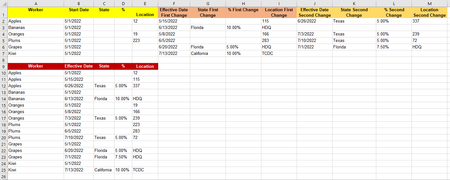
I have a table of workers and for each a set of columns that indicate information that needs to be moved to a linear format. I changed the workers to fruits to make it easier to understand, but t...
 Sep 08, 2022
Sub worker() Dim i As Long Dim j As Long Dim m As Long Dim k As Long Dim l As Long Dim n As Long Range(Cells(15, 1), Cells(1048576, 5)).Clear i = Range("A" & Rows.Count).End(xlUp).Row m = 15 For j = 2 To i Range(Cells(m, 1), Cells(m + 2, 1)).Value = Cells(j, 1).Value Range(Cells(m, 2), Cells(m, 5)).Value = Range(Cells(j, 2), Cells(j, 5)).Value Range(Cells(m + 1, 2), Cells(m + 1, 5)).Value = Range(Cells(j, 6), Cells(j, 9)).Value Range(Cells(m + 2, 2), Cells(m + 2, 5)).Value = Range(Cells(j, 10), Cells(j, 13)).Value m = m + 3 Next j l = Range("A" & Rows.Count).End(xlUp).Row For n = 15 To l If IsEmpty(Cells(n, 2)) And Not (IsEmpty(Cells(n, 1))) Then Range(Cells(n, 1), Cells(n, 5)).Delete n = n - 1 Else End If Next n End SubMaybe with these lines of code. In the attached file you can click the button in cell F10 to run the macro. If the table with original data is large (e.g. 1000 rows) the result table can be in columns P to T for example.

Riny_van_Eekelen
Sep 09, 2022Platinum Contributor
Tami_E Offering you another PQ solution, inserted into the file provided by OliverScheurich earlier. The only requirement here is that you name the columns consistently for each group (Date, State,% and Location). In this example PQ connects to a named range, myData. Make sure you edit the range when the table expands and press Refresh All on the Data ribbon.