Forum Discussion

Need help with formula evaluating progressive rebate against 2 criteria
- May 18, 2023
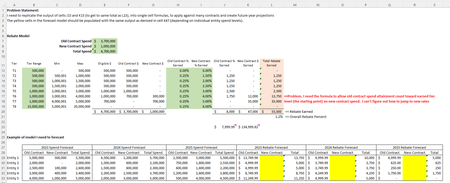
SnowMan55 alternative option:
=SUMPRODUCT($B$12:$B$19*(D30>=$D$12:$D$19)
             -$B$12:$B$19*(B30>=$D$12:$D$19)
             -(B30-$C$12:$C$19+1)*(B30<$D$12:$D$19)*(B30>=$C$12:$C$19)
             +(D30-$C$12:$C$19+1)*(D30>=$C$12:$C$19)*(D30<$D$12:$D$19),
            $I$12:$I$19)
line 1 add tier size if total > tier max
line 2 subtract tier size if Old > tier max
line 3 subtract portion left from Old on that tier
line 4 add portion from total on that tier
line 5 multiply by %
Note that I agree with SnowMan55 that the numbers you have for the Old Contr. are not right. My formula for that portion is
=SUMPRODUCT($B$12:$B$19*(B29>=$D$12:$D$19)
             +(B29-$C$12:$C$19+1)*(B29<$D$12:$D$19)*(B29>=$C$12:$C$19),
            $H$12:$H$19)
similar in concept to the above.
And lots of kudos to SnowMan55 for re-creating that sheet (although I tweaked a couple formulas I thought weren't done how intended)
Lastly I added a number 1 for the min on the first Tier for consistency and for making calculations easier (i.e. that -$C$12:$C$19+1 in my formulas) but could have used +$B$12:$B$19-$D$12:$D$19 instead.
BTW i realized it would be a huge help here to define those ranges with names so the updated formula (I only used in the 2025 part of the table is:
=SUMPRODUCT(TierSize*(J29>=TierMax)
             -TierSize*(H29>=TierMax)
             -(H29-TierMin+1)*(H29<TierMax)*(H29>=TierMin)+
             (J29-TierMin+1)*(J29>=TierMin)*(J29<TierMax),
            NewPercent)

SnowMan55 alternative option:
=SUMPRODUCT($B$12:$B$19*(D30>=$D$12:$D$19)
             -$B$12:$B$19*(B30>=$D$12:$D$19)
             -(B30-$C$12:$C$19+1)*(B30<$D$12:$D$19)*(B30>=$C$12:$C$19)
             +(D30-$C$12:$C$19+1)*(D30>=$C$12:$C$19)*(D30<$D$12:$D$19),
            $I$12:$I$19)
line 1 add tier size if total > tier max
line 2 subtract tier size if Old > tier max
line 3 subtract portion left from Old on that tier
line 4 add portion from total on that tier
line 5 multiply by %
Note that I agree with SnowMan55 that the numbers you have for the Old Contr. are not right. My formula for that portion is
=SUMPRODUCT($B$12:$B$19*(B29>=$D$12:$D$19)
             +(B29-$C$12:$C$19+1)*(B29<$D$12:$D$19)*(B29>=$C$12:$C$19),
            $H$12:$H$19)
similar in concept to the above.
And lots of kudos to SnowMan55 for re-creating that sheet (although I tweaked a couple formulas I thought weren't done how intended)
Lastly I added a number 1 for the min on the first Tier for consistency and for making calculations easier (i.e. that -$C$12:$C$19+1 in my formulas) but could have used +$B$12:$B$19-$D$12:$D$19 instead.
BTW i realized it would be a huge help here to define those ranges with names so the updated formula (I only used in the 2025 part of the table is:
=SUMPRODUCT(TierSize*(J29>=TierMax)
             -TierSize*(H29>=TierMax)
             -(H29-TierMin+1)*(H29<TierMax)*(H29>=TierMin)+
             (J29-TierMin+1)*(J29>=TierMin)*(J29<TierMax),
            NewPercent)
Thank you, both, for your help!! I was spinning on this for so long! Additionally, thank you for catching my error with the old contract calculation! mtarler, I am using named ranges in my master file, I actually removed them so to share the formula since I couldn't figure out how to attach my sample file. 🙂
Thanks again!!