Forum Discussion

JB_SE_ED
Feb 27, 2023Copper Contributor
Need help with a VBA Macro for copying and pasting of rows.
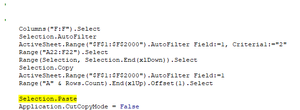
Hello, My experience is fairly limited with Macro's, and even more so with VBA code (so please feel free to be as specific as possible). But I am building an automation flow that uses macro's in...
- Feb 27, 2023
Thank you, I downloaded the workbook. Try this version:
Sub Sample()
    Dim LastRow As Long
    LastRow = Range("A" & Rows.Count).End(xlUp).Row
    Range("F1:F" & LastRow).AutoFilter Field:=1, Criteria1:="2"
    Range("A2:F" & LastRow).Copy Destination:=Range("A" & LastRow + 1)
    Range("F1:F" & LastRow).AutoFilter Field:=1
End Sub

HansVogelaar
Feb 27, 2023MVP

JB_SE_ED
Feb 27, 2023Copper Contributor
HansVogelaar Microsoft 365
- JB_SE_EDFeb 28, 2023Copper ContributorThis is perfect. Thank you so much! HansVogelaar
- HansVogelaarFeb 27, 2023MVP
Try this:
Sub Sample() Dim LastRow As Long Dim Uniques Dim OneValue Dim NewLastRow As Long Dim Idx As Long Application.ScreenUpdating = False LastRow = Range("A" & Rows.Count).End(xlUp).Row NewLastRow = LastRow Uniques = Application.Unique(Range("F2:F" & LastRow)) For Each OneValue In Uniques If OneValue > 1 Then Range("F1:F" & LastRow).AutoFilter Field:=1, Criteria1:=OneValue For Idx = 1 To OneValue - 1 Range("A2:F" & LastRow).Copy Destination:=Range("A" & NewLastRow + 1) NewLastRow = Range("A" & Rows.Count).End(xlUp).Row Next Idx End If Next OneValue Range("F1:F" & LastRow).AutoFilter Field:=1 Application.ScreenUpdating = True End Sub - HansVogelaarFeb 27, 2023MVP
There is probably a better way to do this with VSTACK etc.
(Wait - I made a mistake. I'll be back)