Forum Discussion

Need help with a Lookup Formula
 Oct 28, 2023
PeterBartholomew1 has already answered your question regarding the spill error. Thank you PeterBartholomew1 .
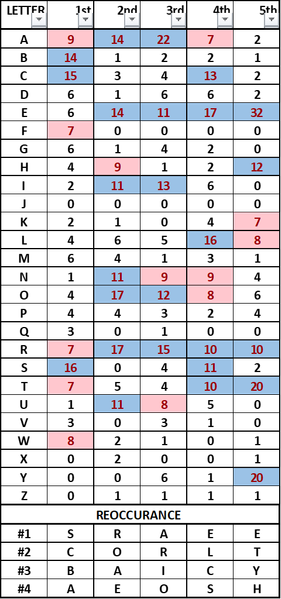
=INDEX($A$3:$A$28,MATCH(1,(B$3:B$28=LARGE(B$3:B$28,ROW($H1)))*(COUNTIF(I$1:I1,$A$3:$A$28)=0),0))An alternative with older versions of Excel could be this formula. The formula is in cell I2 and filled across range I2:M5. The formula must be entered with ctrl+shift+enter if someone doesn't work with Office 365 or Excel for the web or Excel 2021. The entries in cells H2:H5 are done manually in this example.
=REDUCE({"1 #","2 #","3 #","4 #"},SEQUENCE(,5),LAMBDA(x,y,HSTACK(x,
TAKE(SORT(HSTACK(A2:A27,CHOOSECOLS(B2:F27,y)),2,-1),4,1))))
With Office 365 or Excel for the web you can use this formula.
 Woody36060Oct 27, 2023Copper Contributor
- OliverScheurichOct 28, 2023Gold Contributor
PeterBartholomew1 has already answered your question regarding the spill error. Thank you PeterBartholomew1 .
=INDEX($A$3:$A$28,MATCH(1,(B$3:B$28=LARGE(B$3:B$28,ROW($H1)))*(COUNTIF(I$1:I1,$A$3:$A$28)=0),0))An alternative with older versions of Excel could be this formula. The formula is in cell I2 and filled across range I2:M5. The formula must be entered with ctrl+shift+enter if someone doesn't work with Office 365 or Excel for the web or Excel 2021. The entries in cells H2:H5 are done manually in this example.
- Woody36060Oct 28, 2023Copper ContributorThank you Oliver,
I am most familiar with this old style of formulas and will use it. I appreciate all of the help offered by everyone. This reminds me of a story. I was asked "are you a golfer?" I said I thought I was until I played with some real golfers. That's how I feel with you guys. Keep up the good work and know you ARE appreciated.
- PeterBartholomew1Oct 27, 2023Silver Contributor
These formulas are not entered into multi-cell ranges. They are entered into a single cell and the array then spills into adjacent cells for presentation purposes. The spreadsheet I posted contains OliverScheurich 's solution under the description REDUCE/HSTACK.
- PeterBartholomew1Oct 27, 2023Silver Contributor
Nice! I am beginning to get so fed up with building workarounds for Microsoft's monumental blunder in specifying how nested arrays should be treated.
In the present case, I had written a core formula
= SORTBY(letter, column,-1), 4)but hadn't made up my mind whether to go the REDUCE/HSTACK route or MAKEARRAY. At least I could avoid expanding Thunks! I hate trying to explain those to a bewildered user. Creating an array of arrays should be no more complicated that creating the array of concatenated strings
= BYCOL(table,
    LAMBDA(column,
      CONCAT(TAKE(SORTBY(letter, column,-1), 4))
    )
  )
For fixed length strings one could then use
= LET(
    result, BYCOL(table, LAMBDA(column, CONCAT(TAKE(SORTBY(letter,column,-1),4)))),
    MID(result, {1;2;3;4},1)
  )
since MID will return nested arrays.
It is not as if this is a marginal requirement; the majority of workbooks I write require arrays of arrays in more than a single formula. The decision may have retained backward compatibility in Excel, but at the expense of creating an utter mess going forward!
