Forum Discussion

tingxia
Oct 03, 2021Copper Contributor
Need help to data for Invoice data entry
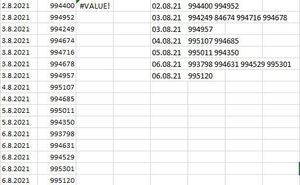
I tried to use If formula in vba to display data on the left(please refer to attached image) to data on the right(if same date, up to 4 data will be in the same row). but my formula is not workin...

Juliano-Petrukio
Oct 03, 2021Bronze Contributor
There are many ways to achieve that.
Using Array formulas. On H1 type the following formula:
=UNIQUE(A1:A16)On I1 cell the formula
=CONCAT(" " &UNIQUE(FILTER($B$1:$B$16,$A$1:$A$16=H1)))
Using VBA and Dictionary Library
Option Explicit

Sub InvoiceDataGrouping()
    Dim DataSet As Variant, Counter As Long, Dict As Object

    'Set Dict = New Scripting.Dictionary 'Early Binding
    Set Dict = CreateObject("Scripting.Dictionary") 'Late Binding

    'stores in an array all the data from columns A and B,
    'starting at A1 and up to the last row with data from column C.
    DataSet = Sheets("WithVBA").Range("A1", Range("B" & Rows.Count).End(3)).Value2

    For Counter = 1 To UBound(DataSet)

        Dict(DataSet(Counter, 1)) = Dict(DataSet(Counter, 1)) _
                                    + " " & DataSet(Counter, 2)
    Next

    Sheets("WithVBA").Range("H1").Resize(Dict.Count, 2).Value = Application.Transpose(Array(Dict.keys, Dict.items))

    Set Dict = Nothing
End Sub
Find attachment