Forum Discussion

Need Help Please..... need and IF function or a Formula to assist
- Oct 11, 2021
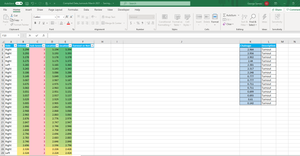
ExcelNovice365 -- Since you did not provide a file, I created my own data for illustration purposes. I hope its close enough to your actual data to understand.
I have concluded that you need to re-structure your data such that:
- the LIMITS and CHAINAGES tables are combined into a single table eg "TurnoutDecision", and
- the CHAINAGES values need to be TRANSPOSED and cast as HEADERS
Once the above has been completed, you merely need to
- reference the VALUE(HEADER) in the CHAINAGES portion of the table,
- compare against the LOCATION 1 & 2 with an IF/AND combo statement,
throw a "1" where the VALUE(HEADER) meets the BETWEEN conditions for Location 1, Location 2:
Note we WRAP the HEADER reference in VALUE in order to convert the TEXT format that is forced upon HEADER items into a NUMERAL for SUM purposes. Without the VALUE() function, you'll get nowhere fast.
Next, the TurnoutTest Column performs a SUM on all CHAINAGES by ROW(s):
Finally, the "Turnout or Not" column performs an IF on the TurnoutTest value:
Of course, COL F & G are oversimplified here for the purposes of illustration.
I challenge you to combine the "TurnoutTest" & "Turnout Or Not" columns into a single column.
See the attached file.Lastly, if you need help TRANSPOSING tables data I suggest referencing this: https://stackoverflow.com/questions/60266169/dynamic-arrays-spill-horizontally
/C

ExcelNovice365 -- Since you did not provide a file, I created my own data for illustration purposes. I hope its close enough to your actual data to understand.
I have concluded that you need to re-structure your data such that:
- the LIMITS and CHAINAGES tables are combined into a single table eg "TurnoutDecision", and
- the CHAINAGES values need to be TRANSPOSED and cast as HEADERS
Once the above has been completed, you merely need to
- reference the VALUE(HEADER) in the CHAINAGES portion of the table,
- compare against the LOCATION 1 & 2 with an IF/AND combo statement,
throw a "1" where the VALUE(HEADER) meets the BETWEEN conditions for Location 1, Location 2:
Note we WRAP the HEADER reference in VALUE in order to convert the TEXT format that is forced upon HEADER items into a NUMERAL for SUM purposes. Without the VALUE() function, you'll get nowhere fast.
Next, the TurnoutTest Column performs a SUM on all CHAINAGES by ROW(s):
Finally, the "Turnout or Not" column performs an IF on the TurnoutTest value:
Of course, COL F & G are oversimplified here for the purposes of illustration.
I challenge you to combine the "TurnoutTest" & "Turnout Or Not" columns into a single column.
See the attached file.
Lastly, if you need help TRANSPOSING tables data I suggest referencing this: https://stackoverflow.com/questions/60266169/dynamic-arrays-spill-horizontally
/C
