Forum Discussion

Need Formula that Accounts for Blank Date
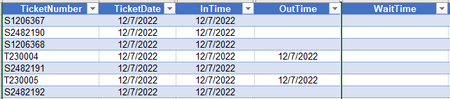

It is not possible to have a formula in column D that returns a result if column D itself is blank - that results in a circular reference. Moreover, when you enter a date in column D, you'd overwrite the formula.
For WaitTime, you can use the formula
=IF([@OutTime]="",TODAY(),[@OutTime])-[@InTime]
Format the WaitTime column as General or as Number with 0 decimal places.
 PhishdawgApr 02, 2023Brass Contributor
HansVogelaar
I like the output created by the formula below. Using the your new suggestion produces in accurate 'WaitTime' and adds unwanted additional information. I may have to deal with the blanks on the Power Automate side.- HansVogelaarApr 02, 2023MVP
There was no way I could have known that the InTime and OutTime columns include the time, since they are formatted to display only the date.
You might use
=IF([@OutTime]="", "", [@OutTime]-[@InTime])