Forum Discussion

Need Automatic Conditional Formatting and the cell next to anything highlighted needs to change
- Jan 14, 2020
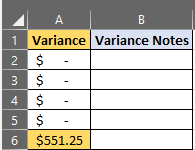
Perhaps something like in the attached example. CF rules used are:
=AND(ISNUMBER(A1),A1<>0) in column A:A
and
=AND(ISNUMBER(A1),A1<>0,ISBLANK(B1)) in column B

Perhaps something like in the attached example. CF rules used are:
=AND(ISNUMBER(A1),A1<>0) in column A:A
and
=AND(ISNUMBER(A1),A1<>0,ISBLANK(B1)) in column B
- Aaron_BennettJan 14, 2020Copper Contributor
Riny_van_Eekelen I have it working and it is a large table that starts with a pivot and then I have IF Statements and Sumif formulas to create four different Actual Vs Budget Comparisons should I create the pivot and copy that information into the table in order to protect all of my formulas so that the pivot doesn't get expanded and overwrite what I have created?
- Riny_van_EekelenJan 14, 2020Platinum Contributor
Difficult to oversee your exact situation from a screenshot, but if there is a chance that the pivot table (pt) will expand to the right, than I would recommend you not put anything to the right-hand side of the pt. You could consider to put all your formulae and formats on the left-hand side of the pt. Just have the pt starting in e.g. H1 in stead of A1. Alternatively, you can have your pt in a separate sheet and "link" to it, using the GETPIVOTDATA function, in the sheet where you calculate variances and do you all your formatting.
- Aaron_BennettJan 14, 2020Copper Contributor
How do I use the GETPIVOTDATA Function I have not used it before?
- Aaron_BennettJan 14, 2020Copper Contributor
Riny_van_Eekelen Thank you very much!
