Forum Discussion

Tiller610
Jan 25, 2023Copper Contributor
need a little help
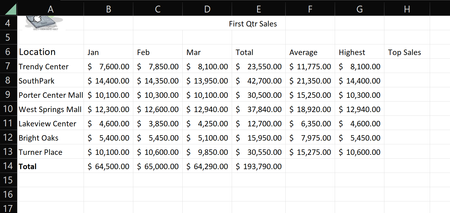
So im pretty new and quite stumped. so here in the Top Sales column I need and IF function to determine which two locations had the highest sales. this seems like it should be fairly easy but ...

Shiming
Jan 25, 2023Copper Contributor
Your description is not clear. Do you want the top two locations with the highest sales for each month? If you want to have an output in H column, I assume you are only comparing the data within the same row, which doesn't give you anything.
If you want the top 2 locations of each month, simply use the conditional formatting function under Home - Style, and select Top/Botton rules - more rules. Just configure what you want.
If you want the top 2 locations of each month, simply use the conditional formatting function under Home - Style, and select Top/Botton rules - more rules. Just configure what you want.
 Tiller610Jan 25, 2023Copper Contributorsorry brother , my instructions are to use an IF function in column H that will output "Top" in the corresponding h row for the 2 highest earning locations (south park , West spring mall). but i will give the conditional formatting a look. thanks
- ShimingJan 25, 2023Copper ContributorOh I get what you mean now. Here is the formula
=IF(OR(LARGE($G$7:$G$13,1)=E2,LARGE($G$7:$G$13,2)=E2),"Top","")
BTW the average column doesn't look alright.