Forum Discussion

KalyanPrasad
Jun 07, 2024Tin Contributor
Need a formula for inventory
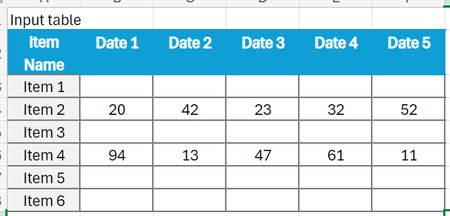
Dear Techies, Consider my input table (INWARD QTY) is And i m looking for an output as shown in the table (STOCK SUMMARY) below. I tried these formulae, but couldn't achiev...
- Jun 07, 2024
Your formulas use H2 and J2 for the date range, but the screenshot shows I2 and K2.
Try this formula:
=SUMPRODUCT(InwardQty[[1-Jun-24]:[31-Jul-24]], (InwardQty[Item Name]=[@[Item Name]])*(DATEVALUE(InwardQty[[#Headers],[1-Jun-24]:[31-Jul-24]])>=$H$2)*(DATEVALUE(InwardQty[[#Headers],[1-Jun-24]:[31-Jul-24]])<=$J$2))
We have to use DATEVALUE since the headers of a table are text, even if they look like dates.
If the date range is in I2 and K2, change $H$2 to $I$2 and $J$2 to $K$2.


PeterBartholomew1
Jun 07, 2024Silver Contributor
The approach I have taken is not so much writing a formula as writing a snippet of code using the Excel formula language. The worksheet formula
= TotalStockλ(startDate, endDate)calls the function
TotalStockλ
= LAMBDA(startDate, endDate,
    LET(
        first, XMATCH(startDate, InwardQty[#Headers]) - 1,
        last,  XMATCH(endDate, InwardQty[#Headers]),
        stock, TAKE(DROP(InwardQty, , first), , last - first),
        total, BYROW(stock, SUM),
        XLOOKUP(
            itemSummary,
            TAKE(InwardQty, , 1),
            total
        )
    )
);