Forum Discussion

renee_crozier
Oct 14, 2024Brass Contributor
Name Not Updating in Power Query When Overwriting Source File
I'm trying to rerun my Power Query after updating a source file but whenever I run it, I get this error: Steps to update source file: Downloaded an updated source file from an internal da...
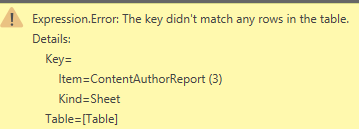
- Oct 15, 2024In the step where you save the csv as xlsx, what is the name of the worksheet? Make sure it matches what is in your query.

JKPieterse
Oct 15, 2024Silver Contributor
In the step where you save the csv as xlsx, what is the name of the worksheet? Make sure it matches what is in your query.
- renee_crozierOct 15, 2024Brass ContributorThank you! I don't know why I didn't think to check the sheet name. I appreciate your help!
- JKPieterseOct 16, 2024Silver Contributor
There is also a way to set up the query so the tab name doesn't matter. When you choose Data, Get Data, From Workbook, a window opens showing some details about the workbook. Make sure you click the main branch of the tree that is displayed:
then click "Transform data". Power Query will show the elements of the workbook in a table, take these steps:
- Filter the "Kind" column for "Sheet"
- Filter the Name column for some text filter like "Begins with"
- To make sure we're only importing one sheet, click "Keep rows", "Keep Top Rows" and choose to keep only 1 row
- Consider if these steps will always give you the sheet you need. If not, change the above steps, these are just examples!
- Click the tiny button with the left and right pointing arrows next to the Data heading in the table.
