Forum Discussion

Multiple Table Lookup From Multiple Criteria
 Aug 05, 2025
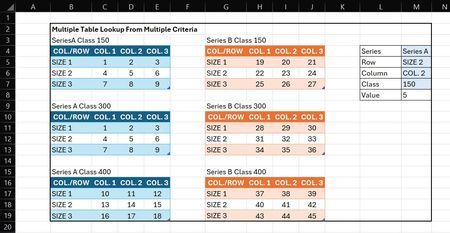
I think any way you approach this task there's going to be some legwork done to make the data whole for lookup purposes. I used INDEX with several named items:
=LET(
    a, XMATCH(Series & " Class " & Class, tables),
    i, XMATCH(Row, SeriesAClass150[COL.ROW]),
    j, XMATCH(Column, SeriesAClass150[#Headers]),
    return, IFNA(
        INDEX(
            (
                SeriesAClass150, SeriesAClass300, SeriesAClass400, SeriesBClass150,
                SeriesBClass300,
                SeriesBClass400
            ),
            i,
            j,
            a
        ),
        ""
    ),
    return
)
I think any way you approach this task there's going to be some legwork done to make the data whole for lookup purposes. I used INDEX with several named items:
=LET(
    a, XMATCH(Series & " Class " & Class, tables),
    i, XMATCH(Row, SeriesAClass150[COL.ROW]),
    j, XMATCH(Column, SeriesAClass150[#Headers]),
    return, IFNA(
        INDEX(
            (
                SeriesAClass150, SeriesAClass300, SeriesAClass400, SeriesBClass150,
                SeriesBClass300,
                SeriesBClass400
            ),
            i,
            j,
            a
        ),
        ""
    ),
    return
)
 Greg_MAug 05, 2025Copper Contributor
Thank you Patrick! This worked. I had to research LET a bit, and I think I understand the storing calculations now.
- Patrick2788Aug 07, 2025Silver Contributor
You're welcome. You may step through the calculations by changing the last instance of "return" to a, i, or j, for example to view the store calculations.
- Greg_MAug 05, 2025Copper Contributor
Hi Patrick2788,
This is what I was looking for, but I am a little confused on the usage of a, i, j and return in your formula? I've never seen that before. Do they have to be in there?