Forum Discussion

Multiple lookup values on XLOOKUP formula
- Apr 16, 2023
Hi ydlazkov
Prefix "_xlfn." means a function (in use) isn't found/available to you and the picture you shared shows that you don't have TEXTSPLIT
According to the doc. the function is available on Windows Version 2208 Build 15601 but you're not at that stage yet (Version 2008 Build 13127.21624)
In the meantime you can replace TEXTSPLIT with FILTERXML as follow (sample attached):
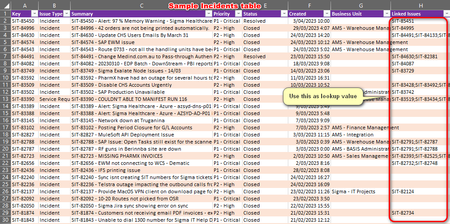
=TEXTJOIN(", ",, XLOOKUP( FILTERXML("<t><w>" & SUBSTITUTE(Change[@[Linked Issues]], ";", "</w><w>") & "</w></t>", "//w"), Incident[Key], Incident[Type], "Not found" ) )NB: FILTERXML won't work on Mac and Excel Web/Online

Hi ydlazkov
Assuming I understood (not sure...)
in E3:
=TEXTJOIN(", ",,XLOOKUP(TEXTSPLIT([@[Linked Issues]],";"), ChangeRequests[Key], ChangeRequests[Type], "Not found"))

Thank for this suggestion however I always got "#NAME?" when the cell under linked issues is empty. Tried using LET function but still got same results. Any idea how to catch this kind of error?
- LorenzoNov 01, 2023Silver Contributor
Hi kimmy0404
Any idea how to catch this kind of error?
Not with the too few information you shared I'm afraid. Follow the guidelines in Welcome to your Excel discussion space! please - at least:
- Excel version and operating system
- Picture showing how your data are strucured
- Formula currently used