Forum Discussion

Herbal_ingenuity
Jul 20, 2023Copper Contributor
Multiple If statements
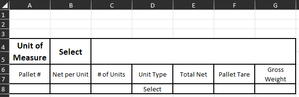
What I am trying to do and it is WAY outside my skill set. I can't even begin to type a formula for it. If B4="kgs" then A8 returns a value of .23 If B4="lbs" then A8 returns a value of .5 ...
- Jul 21, 2023
Depending on how many variable conditions are involved, this might also call for a two dimensional array, accessed by INDEX and MATCH.
As Patrick2788 has already said, you could help us help you by articulating all of the conditions and consequences in as orderly fashion as possible (some tabular form would be ideal) and even better, accompany that by posting a copy of the workbook on OneDrive or GoogleDrive with a link here that grants access.


Herbal_ingenuity
Dec 26, 2023Copper Contributor
I ended up with this...
=IF(F8="","",IF(A8=0, IF($N$5="kgs", SUM((C8*T8)+E8+F8), SUM((C8*U8)+E8+F8)), IF($N$5="kgs", SUM((C8*T8)+E8+F8+0.23), SUM((C8*U8)+E8+F8+0.5))))
T8 & U8 return values based on on what is in D8.
There is probably something simpler, but I ended up there anyways. I have zero knowledge or background with Excel or computers other than how to surf them. I was able to make this formula through trial and error and google.
=IF(F8="","",IF(A8=0, IF($N$5="kgs", SUM((C8*T8)+E8+F8), SUM((C8*U8)+E8+F8)), IF($N$5="kgs", SUM((C8*T8)+E8+F8+0.23), SUM((C8*U8)+E8+F8+0.5))))
T8 & U8 return values based on on what is in D8.
There is probably something simpler, but I ended up there anyways. I have zero knowledge or background with Excel or computers other than how to surf them. I was able to make this formula through trial and error and google.

SergeiBaklan
Dec 27, 2023Diamond Contributor
Another notation could be
=IF(F8="",
    "",
    E8+F8+ C8*IF($N$6="kgs",T8, U8) +
    (0.5 - 0.27*($N$6="kgs"))*(A8<>0) )