Forum Discussion

Multiple IF CONDITIONS formula for different tabs
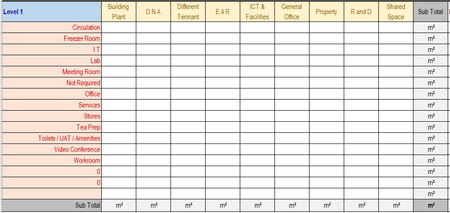

=IFERROR(SUM(FILTER(SCHEDULE[[Existing Floor Area (M²)]:[Existing Floor Area (M²)]],(TOTALS[[#Headers],[Level 1]:[Level 1]]=SCHEDULE[[Level]:[Level]])*(TOTALS[[#Headers],[Building Plant]]=SCHEDULE[[Department]:[Department]])*(TOTALS[@[Level 1]:[Level 1]]=SCHEDULE[[Use / Function]:[Use / Function]]))),"")
With structured reference you can apply this formula. The formula is in cell B2 and filled across range B2:J14.
 RogerioC2021Mar 15, 2024Copper ContributorHi Oliver, Just been thru all the formulas again trying out different variations and changing names and looking at the formulas. Still not working no matter what I do and Excel just keeps popping up the warning message THAT FUNCTION ISNT VALID.
Im using Microsoft Excel 2016. Does that make a difference with the formulas ?
Any help you can provide is greatly appreciated.- Detlef_LewinMar 15, 2024Silver Contributor
I would suggest a pivot table.
"Level" and "Use / Function" in rows area.
"Department" in columns area.
"Floor Area" ín values area.
Set the report layout in tabular form. This could be not part of Excel 2016.
Set subtotals only for "Level".
- OliverScheurichMar 15, 2024Gold Contributor
=SUMPRODUCT((SCHEDULE[[Existing Floor Area (M²)]:[Existing Floor Area (M²)]])*(TOTALS[[#Headers],[Level 1]:[Level 1]]=SCHEDULE[[Level]:[Level]])*(TOTALS[[#Headers],[Building Plant]]=SCHEDULE[[Department]:[Department]])*(TOTALS[@[Level 1]:[Level 1]]=SCHEDULE[[Use / Function]:[Use / Function]]))
The FILTER function isn't available in Excel 2016. In my first reply i didn't know which version of Excel you are working with. In the attached Excel 2013 sample file i've applied SUMPRODUCT instead of FILTER.
