Forum Discussion

Multiple Conditional Formatting based on MONTH()
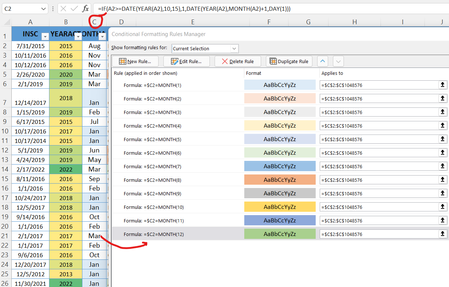
- Mar 23, 2022
Try this formula in C2 and fill down.
=DATE(2000,IF(A2>=DATE(YEAR(A2),10,15),1,MONTH(A2)+1),1)
Apply a standard color scale.

Try this formula in C2 and fill down.
=DATE(2000,IF(A2>=DATE(YEAR(A2),10,15),1,MONTH(A2)+1),1)
Apply a standard color scale.
- MSegasMar 23, 2022Copper Contributor
WOW ! what a nifty and simple solution. Thank you.!
Since my date column expands to 1900, I'll use 1900 instead of 2000.
I noticed that in the second part of the formula you removed the DATE YEAR repetition. Instead of ... , DATE(YEAR(A2),MONTH(A2)+1 your formula uses only MONTH(A2)+1
Your formula: =DATE(2000,IF(A2>=DATE(YEAR(A2),10,15),1,MONTH(A2)+1),1)
My formula: =IF(A2>=DATE(YEAR(A2),10,15),1,DATE(YEAR(A2),MONTH(A2)+1,DAY(1)))
Your formula is cleaner than mine.
Thanks again.
- HansVogelaarMar 23, 2022MVP
It's not really necessary to use 1900. Any year would do.
- MSegasMar 23, 2022Copper ContributorI see. The year is irrelevant because of the if statement
