Forum Discussion

Move entire row to another sheet when a cell is filled
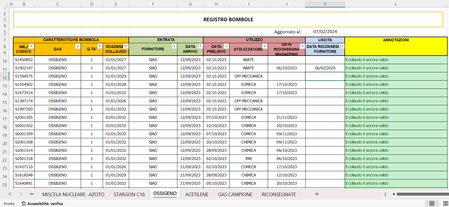

I tried to figure it out but I couldn't make it work. Could you please set it up? Consider that for the sheets "MISCELA NUCLEARE -AZOTO" and "GAS CAMPIONE" the column "DATA RICONSEGNA FORNITORE" is M and not K. You can find the file in attachment. Thanks in advance.

I can still help you with the formula based on the information you provided. Please share the following details:
- Formula Location: In which specific sheet and cell is the current formula located?
- Error Message: What specific error message are you encountering when using the formula?
- Sample Data: Can you share a few sample rows from the "MISCELA NUCLEARE -AZOTO" and "GAS CAMPIONE" sheets, including the values in columns G and M? This will help me understand your data structure and identify potential issues.
With this information, I can diagnose the problem and provide a revised formula that works correctly for all sheets, taking into account the different column positions for "DATA RICONSEGNA FORNITORE".
Additionally, if you have any specific requirements or preferences for the output of the formula, feel free to share them as well. The more information you can provide, the better I can assist you.
I tried to attach an Excel file to help with your Excel sheet.
- alien60Feb 14, 2024Copper Contributor
Since it's the first time I try to execute a macro, I don't know if I'm doing things right. I tried to follow your istructions, meaning that I saved the code in a VBA module but I don't know how to place the macro in the workbook to run automatically. In attachment you can see the excel that I modified but something is missing, I think. For what concerns "MISCELA NUCLEARE -AZOTO" and "GAS CAMPIONE" sheets, the only difference with the other sheets is that the column "DATA RICONSEGNA FORNITORE" is not K but M. I hope I have been clear enough.