Forum Discussion

Move data up if blank or move to next row and retrieve requested data
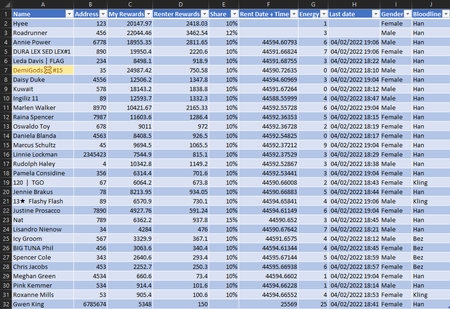
- Feb 04, 2022
I FIRST suggest you use a PivotTable instead and then you add the corresponding filter.
Alternatively (if you really don't want a Pivot Table for some reason), still don't use VLOOKUP etc... and just use FILTER() instead (which according to my MS ref, Excel 2021 should have FILTER and dynamic arrays) so something like:
=INDEX(FILTER(DataTable, DataTable[Bloodline]="Han"), ,{1,9,10})and if you make $C$1 the filter 'name' so the Header row would be like:
Name Gender Han
then the formula could be:
=INDEX(FILTER(DataTable, DataTable[Bloodline]=$C$1), ,{1,9,10})
and quite honestly why even have that last column since it will all be the same?

I FIRST suggest you use a PivotTable instead and then you add the corresponding filter.
Alternatively (if you really don't want a Pivot Table for some reason), still don't use VLOOKUP etc... and just use FILTER() instead (which according to my MS ref, Excel 2021 should have FILTER and dynamic arrays) so something like:
=INDEX(FILTER(DataTable, DataTable[Bloodline]="Han"), ,{1,9,10})
and if you make $C$1 the filter 'name' so the Header row would be like:
Name Gender Han
then the formula could be:
=INDEX(FILTER(DataTable, DataTable[Bloodline]=$C$1), ,{1,9,10})
and quite honestly why even have that last column since it will all be the same?
