Forum Discussion

Mike Hill
Sep 30, 2017Copper Contributor
Missing Excel 2013 worksheet tabs
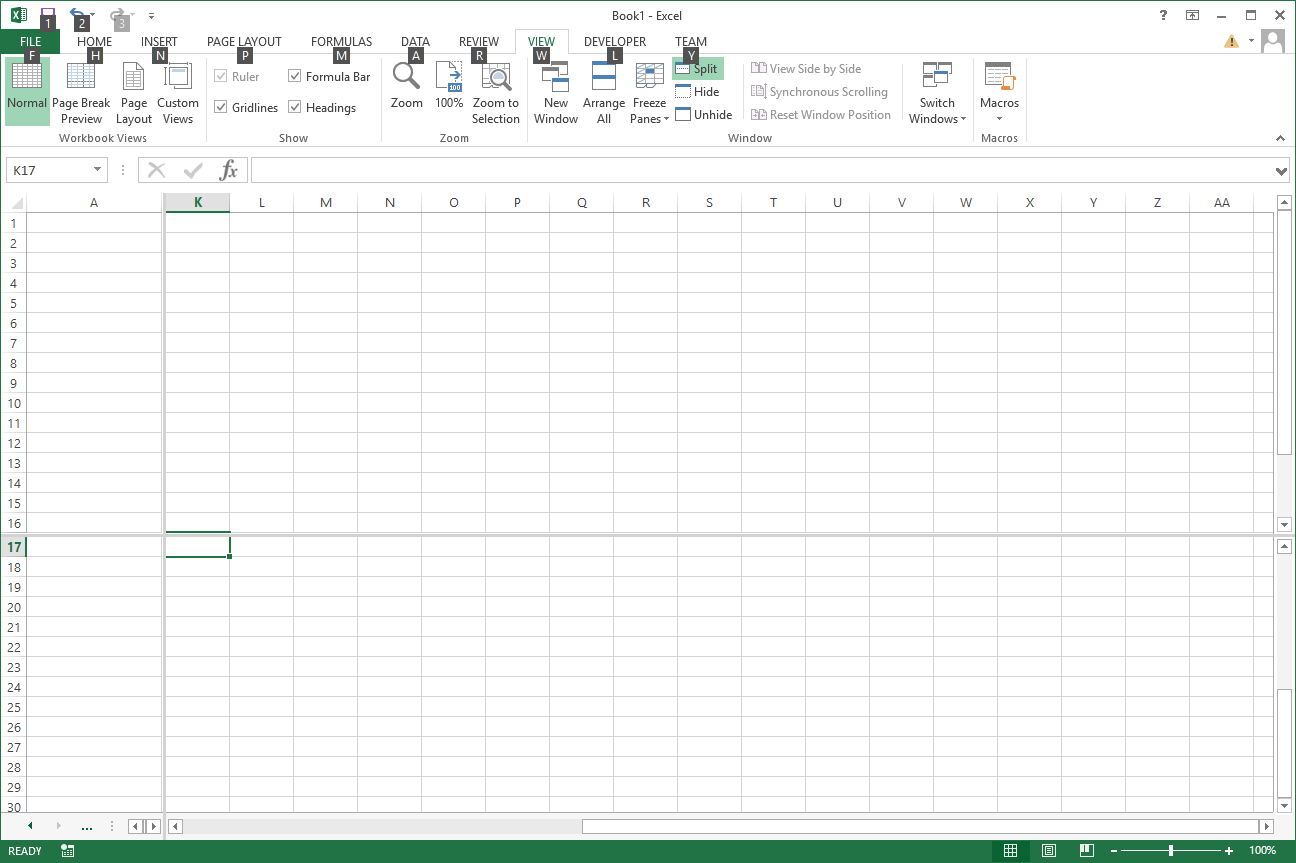
I have an Excel 2013 workbook with multiple sheets. I recently modified one of the sheets to split the window in order to keep column A and row 1 from scrolling. Now I noticed the worksheet tabs at t...
- Oct 02, 2017
Hi Mike,
Yes, that's correct behaviour, there is simply not enough space to show the tabs. You may use right click, or click on 3 dots if they are visible, or temporary move split line to the right.
In general better to use Freeze panes if that's suitable in your case.


Mike Hill
Oct 02, 2017Copper Contributor
I've attached a series of screen shots. If the left pane of the split window is too narrow the worksheet tab names at the bottom collapse. If you hold the mouse over the worksheet tab arrows a popup is displayed (see ExcelTabs04.png).



JKPieterse
Oct 03, 2017Silver Contributor
Aha, now I understand. You cannot change this I'm afraid, only by moving the split further to the right.