Forum Discussion

ExcelClaro
Aug 22, 2022Copper Contributor
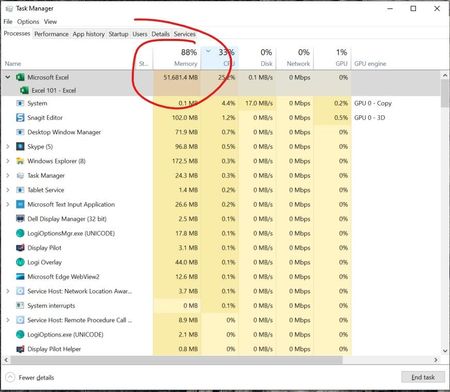
Microsoft Excel 365 HUGE Memory Leak (50 GB RAM)
Hi! I read this https://www.soa.org/news-and-publications/newsletters/compact/2015/march/com-2015-iss53/excel-spreadsheets-best-practices/ yesterday and I was wondering if you could take a look a...

tomoam2
Jan 01, 2023Copper Contributor
Hello! I wish you all a very happy New Year!
.. and back to the topic:
My Excel slowed down a while ago, I noticed a flashing black screen or black rectangles with text "calculation (...)". The problem could not be solved by changing settings in Excel or installing a new operating system. Today I noticed that accessing the network folder is slower than it should be... I did this:
1) In Hyper-V settings (I use virtual machines) I set the second network card to Hyper-V exclusive.
2) In the network settings (Windows 10) I have disabled the Hyper-V Virtual network adapter "Default Switch". All virtual machines will use second network card exclusive...
Results:
1) Access to the network folder is at full speed again.
2) Excel works noticeably faster (I use a lot of INDIRECT functions)
I hope you can find the source of your Excel problems. Good luck!
.. and back to the topic:
My Excel slowed down a while ago, I noticed a flashing black screen or black rectangles with text "calculation (...)". The problem could not be solved by changing settings in Excel or installing a new operating system. Today I noticed that accessing the network folder is slower than it should be... I did this:
1) In Hyper-V settings (I use virtual machines) I set the second network card to Hyper-V exclusive.
2) In the network settings (Windows 10) I have disabled the Hyper-V Virtual network adapter "Default Switch". All virtual machines will use second network card exclusive...
Results:
1) Access to the network folder is at full speed again.
2) Excel works noticeably faster (I use a lot of INDIRECT functions)
I hope you can find the source of your Excel problems. Good luck!
tomoam2
Feb 02, 2023Copper Contributor
Hello again,
New fix/idea:
https://support.cch.com/kb/solution/000188633/High-Resolution-displays-may-cause-display-issues-while-using-Microsoft-Excel-in-CCH-ProSystem-fx-Engagement-or-Workpaper-Manager?IsNewArticle=True
Find file: excel.exe.manifest
Make a backup
Edit file excel.exe.manifest:
BEFORE "<dpiAware>true</dpiAware>"
AFTER "<dpiAware>false</dpiAware>"
Save changes...
New fix/idea:
https://support.cch.com/kb/solution/000188633/High-Resolution-displays-may-cause-display-issues-while-using-Microsoft-Excel-in-CCH-ProSystem-fx-Engagement-or-Workpaper-Manager?IsNewArticle=True
Find file: excel.exe.manifest
Make a backup
Edit file excel.exe.manifest:
BEFORE "<dpiAware>true</dpiAware>"
AFTER "<dpiAware>false</dpiAware>"
Save changes...