Forum Discussion

ExcelClaro
Aug 22, 2022Copper Contributor
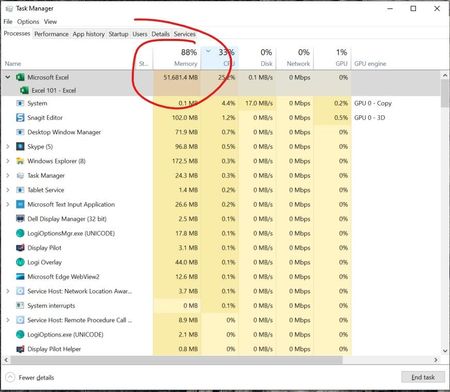
Microsoft Excel 365 HUGE Memory Leak (50 GB RAM)
Hi! I read this https://www.soa.org/news-and-publications/newsletters/compact/2015/march/com-2015-iss53/excel-spreadsheets-best-practices/ yesterday and I was wondering if you could take a look a...

thumperbun
Nov 10, 2022Copper Contributor
FYI for those still following this thread, I have seen the problem return twice now. However, just closing Excel, deleting the Excel registry key again and re-launching immediately resolves the issue without a reboot. Needing to do this once a week will be annoying if it continues, but it is still much better than the performance problem itself. The return of the issue may coincide with updates that are happening but I have not been tracking that.

SiliconKnight
Dec 29, 2022Copper Contributor
thumperbunI've recently started having issues with Excel and stumbled across this thread. I will try some of the solutions that y'all have suggested, but I wanted to chime in that I see the "locking up" of the Excel App/video when switching between two spreadsheets (separate files) with formulas linking between them.
- tomoam2Feb 02, 2023Copper ContributorHello again,
New fix/idea:
https://support.cch.com/kb/solution/000188633/High-Resolution-displays-may-cause-display-issues-while-using-Microsoft-Excel-in-CCH-ProSystem-fx-Engagement-or-Workpaper-Manager?IsNewArticle=True
Find file: excel.exe.manifest
Make a backup
Edit file excel.exe.manifest:
BEFORE "<dpiAware>true</dpiAware>"
AFTER "<dpiAware>false</dpiAware>"
Save changes... - tomoam2Jan 01, 2023Copper ContributorHello! I wish you all a very happy New Year!
.. and back to the topic:
My Excel slowed down a while ago, I noticed a flashing black screen or black rectangles with text "calculation (...)". The problem could not be solved by changing settings in Excel or installing a new operating system. Today I noticed that accessing the network folder is slower than it should be... I did this:
1) In Hyper-V settings (I use virtual machines) I set the second network card to Hyper-V exclusive.
2) In the network settings (Windows 10) I have disabled the Hyper-V Virtual network adapter "Default Switch". All virtual machines will use second network card exclusive...
Results:
1) Access to the network folder is at full speed again.
2) Excel works noticeably faster (I use a lot of INDIRECT functions)
I hope you can find the source of your Excel problems. Good luck!