Forum Discussion

ExcelBear
May 01, 2022Copper Contributor
Merge Columns in Date Order
I am looking for a formula or Macro that can merge/combine two columns of data into one based on date order. The data in columns B, C, E, and F would be manually entered, and the data in columns H an...
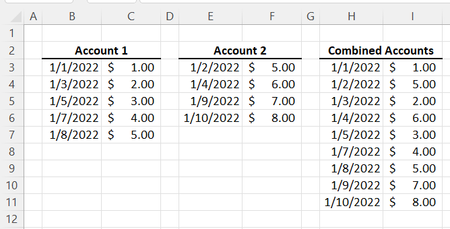

HansVogelaar
May 01, 2022MVP
Here is a macro:
Sub Combine()
    Dim m As Long
    Application.ScreenUpdating = False
    Range("H3:H" & Rows.Count).Clear
    m = Range("B" & Rows.Count).End(xlUp).Row
    If m > 2 Then
        Range("B3:C" & m).Copy Destination:=Range("H3")
    End If
    m = Range("E" & Rows.Count).End(xlUp).Row
    If m > 2 Then
        Range("E3:F" & m).Copy Destination:=Range("H" & m + 1)
    End If
    Range("H2").CurrentRegion.Sort Key1:=Range("H2"), Header:=xlYes
    Application.ScreenUpdating = True
End Sub
ExcelBear
May 10, 2022Copper Contributor
This is fantastic! Thank you for putting this macro together!
I am having trouble modifying the macro to add additional account columns. I have added snips (also attached) of the macro I got working for the first two accounts ("Ent bank Account" and " Southwest Credit Card"), although I would like to add the additional accounts as well ("UMB HSA Account" and "Venmo Account").
Could you help me to modify the macro to accommodate for more account columns? Again, I appreciate the assistance on this, my macro skills are quite limited at the moment.


- HansVogelaarMay 10, 2022MVP
Here is a new version.
Sub Combine() Dim v As Variant Dim m As Long Dim r As Long Application.ScreenUpdating = False ' Clear target range Range("Z4:AD" & Rows.Count).Clear ' Initialize target row r = 4 ' Change and expand as needed For Each v In Array("B", "H", "N", "T") ' Last used row in column m = Cells(Rows.Count, v).End(xlUp).Row If m > 3 Then ' Copy data Range(Cells(4, v), Cells(m, v)).Resize(, 5).Copy Destination:=Range("Z" & r) ' Increment target row r = r + m - 3 End If Next v ' Sort on date column Range("Z3:AD" & r - 1).Sort Key1:=Range("Z3"), Header:=xlYes Application.ScreenUpdating = True End Sub- ExcelBearMay 15, 2022Copper Contributor