Forum Discussion

Chaitanya_Palley
Aug 31, 2022Copper Contributor
Macro with working excel formula returns #Value
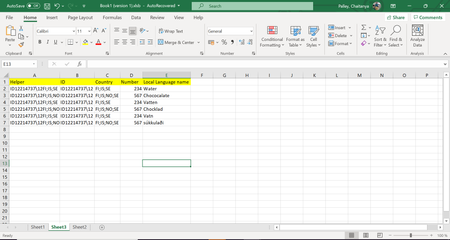
Hi All, I am trying to write a macro with a formula to pull a column value from set of data without storing the formula in the cell. This formula is working totally fine with expected results whe...

mtarler
Aug 31, 2022Silver Contributor
So that is quite a formula. I noticed that it references row 5 for a few items and row 5 is blank.
That formula also seems redundant how it keeps re-checking IF((Sheet3!$B:$B=$H5)*ISNUMBER(SEARCH($G5,Sheet3!$C:$C))=1,
after you do the 1st IF check all the sub-parts are not needed to check that anymore.
I would also not do all of this under an EVALUATE but use the VBA functionality itself instead (and it would be easier to debug then).
That aside, if you don't want a big formula inside the cell what about using a LAMBDA function instead?
That formula also seems redundant how it keeps re-checking IF((Sheet3!$B:$B=$H5)*ISNUMBER(SEARCH($G5,Sheet3!$C:$C))=1,
after you do the 1st IF check all the sub-parts are not needed to check that anymore.
I would also not do all of this under an EVALUATE but use the VBA functionality itself instead (and it would be easier to debug then).
That aside, if you don't want a big formula inside the cell what about using a LAMBDA function instead?
 __nsreen_115Aug 31, 2022Brass Contributorشكرا للافادة
- __nsreen_115Aug 31, 2022Brass Contributorاحسنت