Forum Discussion

fjltbh
Jan 27, 2024Copper Contributor
Macro Plus and Minus Button Help
Hi, I am trying to create a tablet friendly stock list for inventory. I have made functioning buttons with the attached macros to make them add and subtract for the first line of my table. My q...

djclements
Jan 28, 2024Silver Contributor
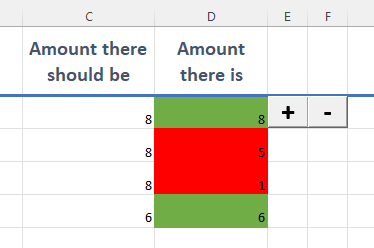
fjltbh Another strategy you might consider is to have only one button for each command and modify the code to add or subtract one from the active cell. First, move the buttons to the header row, then freeze the top row so they are always visible when scrolling down... on the ribbon, go to View > Freeze Panes > Freeze Top Row.
Command Bar in the Header Row
Then, use something along these lines to add or subtract one from the active cell if it's within the target range (column D):
Option Explicit

Private Sub AdjustValue(amount As Double)
    Dim ws As Worksheet, target As Range, rg As Range
    Set ws = ActiveSheet
    Set target = ws.Range("D2:D" & ws.Cells(ws.Rows.Count, 4).End(xlUp).Row + 1)
    Set rg = ActiveCell

'Verify the active cell is within the target range (column D)
    If Not Intersect(target, rg) Is Nothing Then
    ' verify the current value is numeric
        If IsNumeric(rg.Value) Then
            rg.Value = rg.Value + amount
        Else
            MsgBox "Non-numeric value detected", vbExclamation
        End If
    Else
        MsgBox "Please select a cell within column D", vbExclamation
    End If
End Sub

Sub MinusOne()
    Call AdjustValue(-1)
End Sub

Sub PlusOne()
    Call AdjustValue(1)
End Sub
Note: the buttons can also be made to work with both column C and D by changing the target range from "D2:D" &... to "C2:D" &... in the code above. Cheers!