Forum Discussion

TIGER-18
Nov 12, 2023Copper Contributor
lookup with different results
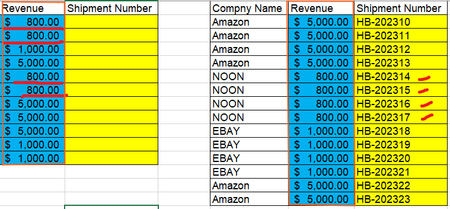
Hi, I'm struggling with the below issue in Excel. I have 2 tables and I would like to make a lookup between them but the challenge here is the value array is duplicate and I want to return the invoi...
 Nov 12, 2023
=INDEX($E$2:$E$10,MATCH(1,(A2=$D$2:$D$10)*(COUNTIF($A$2:A2,A2)=$F$2:$F$10),0))You can try this formula along with a helper column. Enter the formula with ctrl+shift+enter if you don't work with Office 365 or Excel for the web or Excel 2021.
=COUNTIF($D$2:D2,D2)This is the formula that creates the helper column in the example. The formula is in cell F2 and filled down.

rachel
Nov 12, 2023Iron Contributor
Hi, if you have office365, you can create a helper column using COUNTIF as OliverScheurich suggested, and create another helper column using TRANSPOSE + FILTER to display all the invoice numbers associated with a given revenue. and then use "INDEX" function to choose one of the invoice numbers.