Forum Discussion

Lookup Formula with multiple column
- Feb 09, 2024

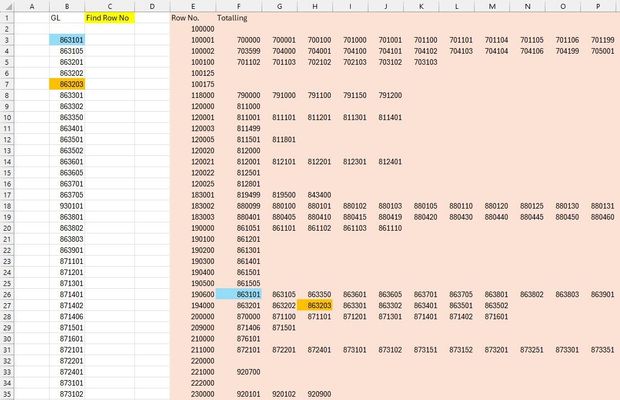
PeterBartholomew1 and Carlyn1505 Probably the simplest method for this scenario with MS365 is to use the TOCOL and IFS method:
=TOCOL(IFS($F$2:$P$35=B3, $E$2:$E$35), 2)
Or with the MAP function to do the entire GL range in one shot:
=MAP(B3:B35, LAMBDA(v, TOCOL(IFS(F2:P35=v, E2:E35), 2)))
The IFS function returns #NA by default if the logical test evaluates to FALSE, so there is no need for the NA() function (like with IF). The TOCOL function then eliminates all errors, with the optional [ignore] argument set to 2, returning only the matching value as the final result.
Note: if there's a chance that more than one match may be found in the lookup range, wrap the TOCOL/IFS combo inside the TAKE function to return the first result only. The optional [scan_by_column] argument (TOCOL) can also be used to search top-to-bottom, left-to-right, if desired. Also, IFERROR can be used to eliminate any #CALC! errors in the event that no match is found.

Nice simplifying PeterBartholomew1 's formula with IFS here!